Pengaturan
Organisation settings
Rename your organisation, find the id an operator needs to link to you, and see which parts of the account the Nerve team owns rather than you.
Terakhir diperbarui
Who this is for: Owner — requires
org.manage. Where: Settings → Organisation
The organisation is the top of the hierarchy: it owns your properties, your members and your roles. This screen is its profile — a short page, most of it read-only.
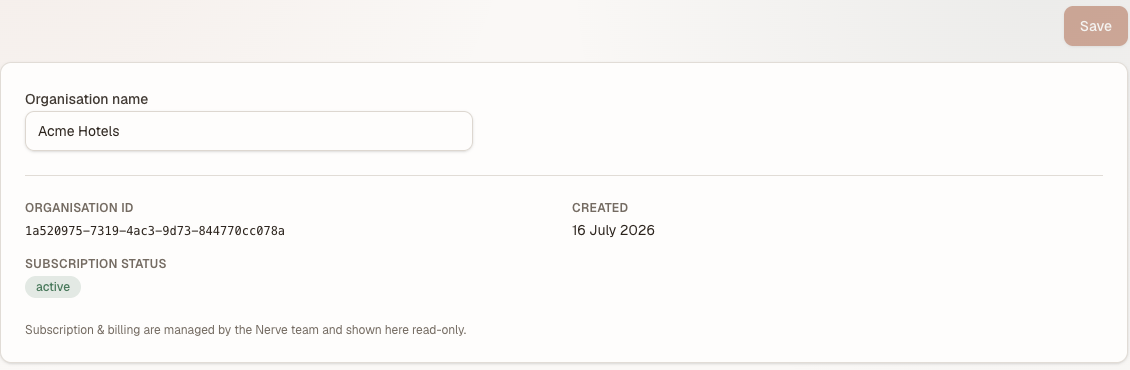
One editable field and three you cannot change. The id is the one to copy — an operator asks for it.
Rename your organisation#
- Open Settings → Organisation.
- Edit Organisation name.
- Select Save.
The new name appears immediately in the property switcher, the breadcrumb and the workspace picker — everywhere the organisation is named.
Catatan
The organisation name is not the name that appears on a guest's confirmation or invoice. That is the property's legal / billing name, on Properties and hotel settings.
Find your organisation id#
The Organisation ID field is read-only and exists to be copied. You need it in one situation: a management company that is going to operate your hotels asks you for it, so they can send you an operator-link invitation. See Operator links and the delegation roster.
It is an identifier, not a secret — but nothing happens on the strength of it alone. An invitation still has to be accepted by you, from inside your own organisation.
What you cannot change here#
| Field | Who owns it |
|---|---|
| Organisation ID | Nerve, at creation. It never changes. |
| Created | Nerve, at creation. |
| Subscription status | The Nerve team. Shown here read-only. |
Subscription and billing are deliberately not editable in the product. If the status shown is not what you expect, that is a conversation with Nerve rather than a setting you have missed.
If the page says you don't have access#
org.manage is an Owner-only permission by default — a Manager does not hold it. The rest of the Settings menu is unaffected: Hotel, White-label, Notifications and the others each stand on their own permission, so a Manager still reaches them. Why two people see different menus covers the general case.
What's next#
- Properties and hotel settings — the property-level identity underneath this one
- Team — who else is in this organisation
- The audit log — every change made here is recorded