Front Desk
Folios: post, split and transfer charges
One account per stay, or several. Post a charge, correct one with a linked reversal, route a folio to a master bill, and settle to an invoice.
Terakhir diperbarui
Who this is for: Front Desk, Manager, Owner — requires
frontdesk.folio.postto post a charge,frontdesk.folio.transferto add a folio or move a line, andfrontdesk.invoice.issueto settle. Where: Front Desk → Guest Folio
A folio is one account attached to a stay. Every charge and every payment lands on a folio, and its balance is simply the postings minus the payments.
A stay opens with one Guest folio at check-in, already carrying the room and tax postings and any deposit you took. It can carry more than one — a Company folio for the employer, an OTA folio for a channel that collects, a Government folio for an institutional booking, a Master folio for a group.
Catatan
Folios, payments and group billing are one screen. Guest Folio replaces the separate Folios & Billing, Payments and Group Billing menus — posting a charge, taking the payment for it and settling the result were always one piece of work, and splitting them across three screens only moved the work around. Nothing about what you can do changed, and neither did the permissions.
Find the stay#
The Folios side of the screen bills one stay. Use Find a stay — it matches a guest name, a room number or a booking code — then pick the stay from the list beside it. Its folios appear below with their balances.
Coming from a booking is quicker still: Open guest folio on a stay in the reservation lands here with that stay already chosen.
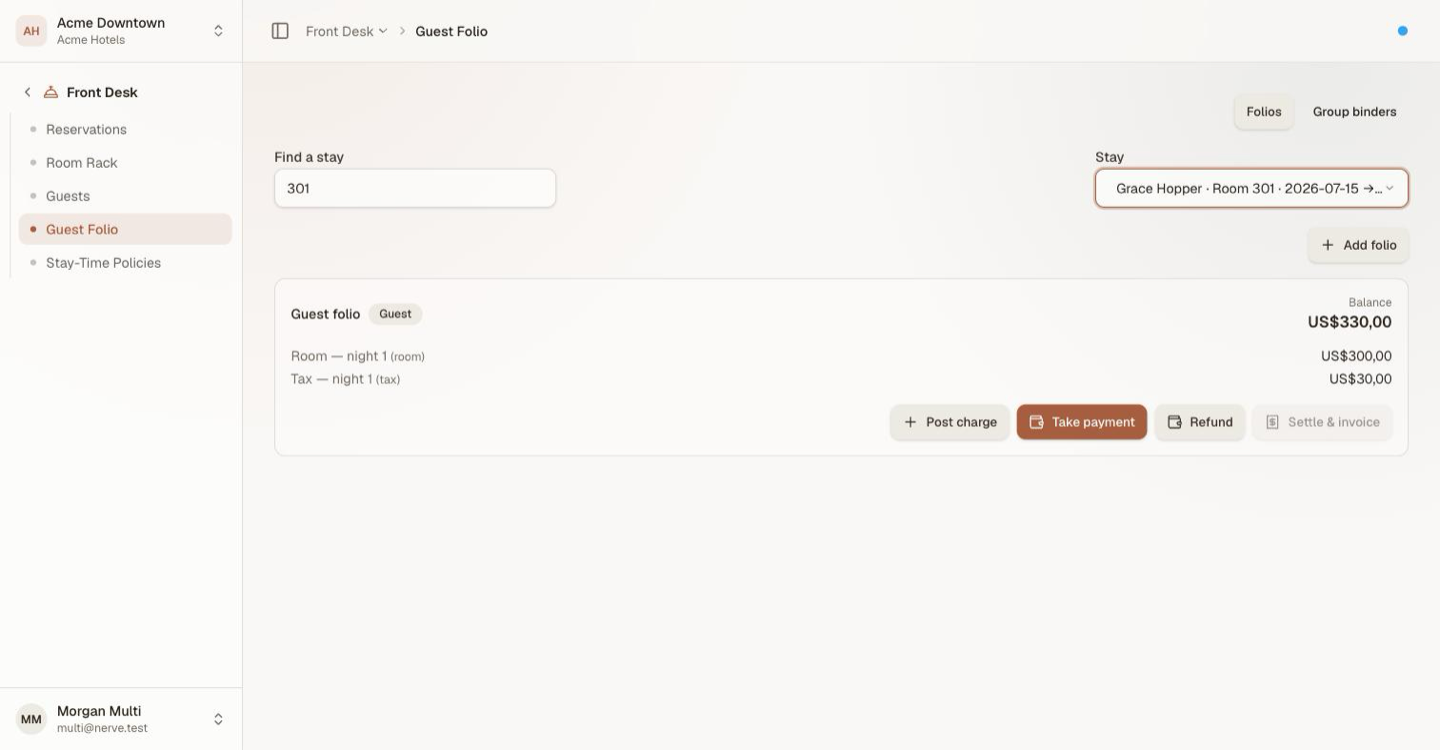
One stay's folio, itemised, with the balance at the top.
Open the bill on its own page#
A folio's label is a link to its own page. That is the cashier's view, and it differs from the card above in one way that matters at a busy desk: every action sits in a single right-aligned row above the bill — Post charge · Payment · Refund · Split folio · Print bill · Check out — and the card below no longer repeats them.
One row, one place to look, whatever you came to do.
The stay summary#
Above the charges sits one line stating what is being billed:
24 Aug 2026 → 26 Aug 2026 · 2 nights · 1 adult · Deluxe Room · Rp 800.000/night
It renders in the hotel's currency and the hotel's date format, not the browser's — a cashier reading a bill to a guest is quoting the property's own numbers.
Charges are grouped#
The bill groups its lines rather than listing a dozen equal-weight rows: Accommodation, Charges, Adjustments, Taxes & service charge, then Total charges.
Post a charge#
- Find the stay.
- On the folio you want to charge, select Post charge.
- Choose Incidental for something the guest consumed, or Adjustment to correct the bill.
- Enter a description and the amount.
- Select Post.
The balance moves by exactly that amount. An Adjustment may be negative, which is how you credit a folio without pretending a refund happened — a refund moves money, an adjustment corrects a charge.
Where a charge came from#
A charge raised by a point-of-sale outlet carries Posted by <outlet> on its line. A charge posted at the desk carries no such note — the absence is the statement that a person at the front desk keyed it.
When a guest queries a line, that is usually the first question: which bar, which restaurant, which shift. See charging a check to the room.
Correct a charge with a reversal#
A charge that should not have been posted is reversed, not deleted.
- Find the line on the bill.
- Select Reverse (the ↺ on its row).
- Give a reason — why is this being corrected?
- Select Post reversal.
A linked correcting line appears indented under the original, the original is struck through and badged Reversed, and the balance returns to what it was before the charge. As the dialog puts it: a reversal posts the opposite amount and stays linked to the line it corrects, so the bill shows the pair rather than two unexplained entries.
Penting
A line is corrected once. Reversing the same line twice is refused, and so is reversing a reversal. If the correction was itself wrong, post a fresh charge — a chain of corrections correcting corrections is a bill nobody can read, and the point of the pairing is that anyone can see at a glance what happened.
Open a second folio#
Splitting a bill in Nerve means giving the stay another account to put charges on.
- Find the stay.
- Select Split folio (or Add folio on the card view).
- Choose Company, OTA or Government.
- Give it a label and, if there is one, an account reference.
- Confirm.
The new folio opens empty at zero. Nothing has moved yet — the split is the container; the transfer is what fills it.
Route a folio to a master bill#
One of a stay's folios can be nominated as the bill the others route to.
Set it with Set master bill on the folio that should route. The routing folio then reads Routes to <folio>, and opening the master shows Folios routed here — each with its own balance, so the person settling it can see what they are settling.
Catatan
The master bill is per-stay. It can only be another folio on the same stay; pointing it at a folio on a different stay is refused. Routing many stays onto one account is a different thing with its own screen — see group bookings and master-folio routing.
Transfer a charge to another folio#
Once a stay has more than one open folio, every posting gets a Move → control beside it.
- Find the posting on the folio it is currently on.
- Open Move → and choose the target folio.
The line moves. Both balances update, and the total across the stay is unchanged — a transfer re-points a charge, it does not copy it, so nothing is ever counted twice.
A worked split#
A two-night stay whose company pays the room and the guest pays their own extras.
After check-in with a 100.00 deposit, the guest folio reads:
| Line | Amount |
|---|---|
| Room (2 nights) | 800.00 |
| Tax | 80.00 |
| Deposit (payment) | −100.00 |
| Balance | 780.00 |
Post a Minibar 15.00 incidental and it becomes 795.00. Now add a Company folio and use Move → to send the Room and Tax lines onto it:
| Folio | Balance |
|---|---|
| Guest | −85.00 |
| Company | 880.00 |
| Stay total | 795.00 |
The guest folio is now in credit, because the 100.00 deposit stayed where it was paid and only 15.00 of charges remain against it. The stay total never moved. Move the deposit too, or refund the credit — taking payments and issuing refunds covers both.
Tips
Move the charges, then look at the payments. A deposit is a payment on a folio, not on the stay, so a transfer that leaves it behind produces exactly the credit balance above. It is correct arithmetic and it surprises people every time.
Print the bill#
Print bill produces the folio document and opens it. Its lines match the bill on screen, reversal pairs included.
Settle a folio#
- Bring the folio's balance to zero — take the payment, or transfer the remaining charges elsewhere.
- Select Settle & invoice.
A numbered invoice is generated whose lines match the folio, including anything transferred onto it. Settle & invoice stays disabled while the balance is anything other than zero; that is the gate, and it is deliberate.
A settled folio keeps every posting and payment. Checking a guest out settles their guest folio for you — see check a guest out — but a company, government or OTA folio on the same stay is settled here.
Close the shift#
The Shift close tab reconciles what the shift actually took: guest payments by method, with card payments broken down by the card network and bank they were tagged with rather than sitting in one undifferentiated card row. A payment nobody tagged reads Not tagged, which is a prompt rather than an error.
What's next#
- Taking payments and issuing refunds — money in and money back out
- Group bookings and master-folio routing — routing many stays onto one account
- Outstanding Folio — every open bill in the property, in one report
- The terminal — where an outlet charge to the room is raised
- Check a guest out — the balance gate at departure