Front Desk
Taking payments and issuing refunds
Money in and money back out, always against a folio rather than a stay — with the reference that makes it answerable later.
Terakhir diperbarui
Who this is for: Front Desk, Manager, Owner — requires
frontdesk.payment.taketo take a payment andfrontdesk.payment.refundto issue one back. Where: Front Desk → Guest Folio
Taking money happens on the same screen as charging for it. Find the stay on the Folios side of Guest Folio and every folio it holds appears below with its balance and its actions — Post charge, Take payment, Refund and Settle & invoice together on the card.
A payment always lands on a folio, never on a stay. A stay with a guest folio and a company folio has two balances, and it matters which one you credit.
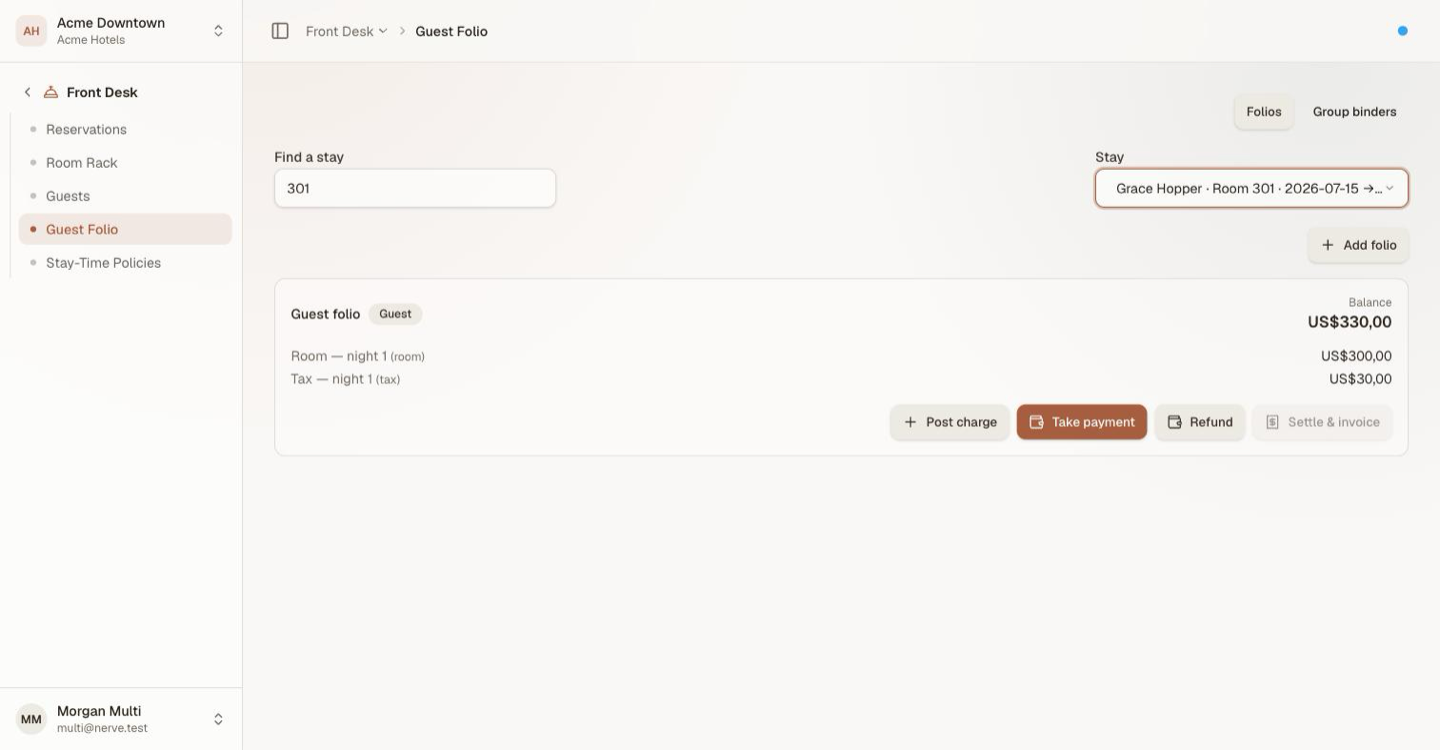
Charging and collecting are the same job, so they are on the same card. Which folio you are on is the decision that matters — not which screen.
Catatan
On staging, a card payment is recorded against the folio with its reference — no charge is authorised, because no payment gateway is wired. In production the gateway responds before the payment posts. Declined-card behaviour cannot be demonstrated on staging, and a real card number must never be entered there.
Take a payment#
- Find the stay.
- On the folio being paid, select Take payment.
- Choose the method — Card, Cash or Other.
- Enter the amount.
- Enter a Reference — the gateway token, the drawer reference, the cheque number.
- Select Take payment.
The balance drops by that amount immediately. The payment shows on the folio with its method and reference, which is what makes a query three weeks later answerable.
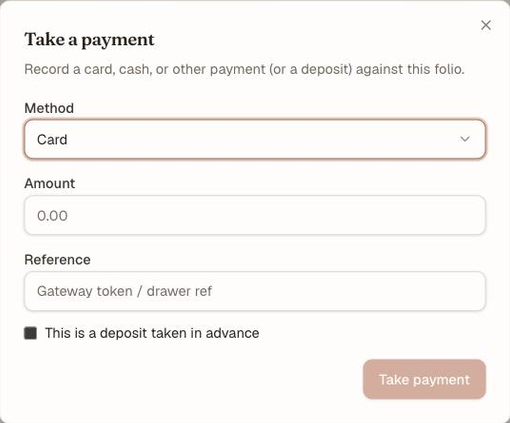
Method, amount, reference. The Reference is the field that makes the payment traceable later, and the checkbox under it is what marks money taken in advance.
Amounts must be positive. To reduce a bill rather than collect money, post a negative Adjustment instead — see folios.
Record a deposit#
A deposit is a payment taken before the charges it will cover exist.
Tick This is a deposit taken in advance in the payment dialog. It posts as an ordinary payment against the balance, and shows on the folio as Deposit rather than Payment.
The distinction is for reading the folio, not for arithmetic: a deposit reduces the balance the same way any payment does.
Issue a refund#
- Find the stay.
- On the folio holding the money, select Refund.
- Choose the method, amount and reference.
- Select Refund.
The refund appears on the folio as a reversing entry, and the balance rises by that amount.
Penting
A refund cannot exceed the net amount paid on that folio. Refund a 100.00 deposit twice and the second attempt is refused — the folio cannot pay out money it never took in. If a refund is refused, check you are on the folio the money actually landed on: a transfer moves charges between folios but leaves payments where they were paid.
Refunds remain available on a folio that is no longer open, which is what makes a post-departure refund possible. Only a voided folio takes no further movement.
What's next#
- Folios: post, split and transfer charges — the charges these payments settle
- Group bookings and master-folio routing — settling one account for many stays
- Escalation — when a refund needs a second pair of eyes