Front Desk
Stay-time policies
Set the house check-in and check-out clock times, override them per room category or rate plan, and leave time to turn a room.
Terakhir diperbarui
Who this is for: Front Desk, Manager, Owner — requires
frontdesk.reservation.readto see the screen andfrontdesk.staypolicy.manageto change it. Where: Front Desk → Stay-Time Policies
A stay-time policy answers three questions about a stay: what time it starts, what time it ends, and how long the room needs afterwards before the next guest can have it.
Without any policy the house runs on the built-in 14:00 / 11:00. Adding one is how you say otherwise — and how you give a day-use rate or a villa its own clock.
Understand which policy wins#
Three grains, most specific first:
| Grain | Applies to | Beats |
|---|---|---|
| Rate plan | Stays on that rate plan | Everything |
| Room category | Stays whose room type matches | The hotel default |
| Hotel default | Every stay | The built-in 14:00 / 11:00 |
Exactly one policy can exist at each point — one hotel default, one per room category, one per rate plan. Trying to add a second for the same scope is refused, and the screen says which one to edit instead.

The screen is laid out in that order, most general at the top. Here the Non-Refundable rate checks out an hour after everyone else — and the hotel default underneath it did not change to allow that.
A policy is also one of two kinds:
- Fixed — the clock times are the policy. Everyone checks in at 14:00.
- Rolling 24h — the stay runs 24 hours from arrival, so a guest arriving at 19:00 leaves at 19:00.
Set the house default#
- Open Front Desk → Stay-Time Policies.
- Select New policy.
- Name it — the name is what the desk and the rack will show.
- Leave the scope as the hotel default.
- Choose Fixed or Rolling 24h.
- Set the check-in and check-out times.
- Set the turnaround in minutes.
- Save.
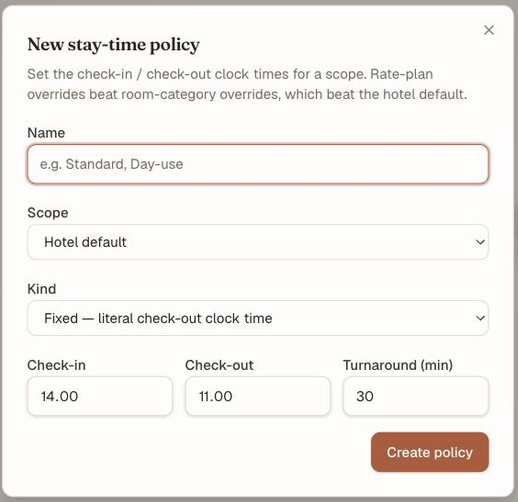
One dialog creates all three grains — Scope is what decides which one you are writing.
The turnaround is the gap the room needs between one stay leaving and the next arriving. It renders as an amber strip on the room rack, and it is what stops the rack proposing a same-day back-to-back that housekeeping cannot physically deliver.
Override for a room category or a rate plan#
- Select New policy.
- Change the scope to the room category, or to the rate plan.
- Pick which one from the selector.
- Set the times and turnaround as above, and save.
Rate-plan overrides are where early check-in, late check-out and day-use rates live: the rate carries its own clock, so selling it is all it takes for the stay to inherit the right times.
Catatan
The room-category and rate-plan selectors read the Reservations catalog, which needs
crs.rates.read. Without it the screen still works, but scopes show as raw codes and ids rather than names — an Owner or Manager will see names, a Front Desk account may not.
Edit or remove a policy#
Edit changes any field including the scope. Delete asks for a confirmation, then removes the policy — stays it used to cover fall back to the next grain down, and if that was the hotel default being deleted, to the built-in 14:00 / 11:00.
Deleting a policy does not restate stays that are already booked.
What's next#
- The room rack: assign, move, block — turnaround buffers and the hour-precision day view
- Set up the ancillary catalog — selling an early check-in rather than policy-ing it