Front Desk
Guest profile details
Who a guest is and how they were won, whether they are a VIP or blacklisted, the identity documents and scans you record at check-in, their contacts, loyalty and standing preferences.
Terakhir diperbarui
Who this is for: anyone who works a guest profile — Front Desk, Manager, Owner. Reading needs
frontdesk.guest.read, editingfrontdesk.guest.write, and revealing a masked value its own narrower permission. Where: Front Desk → Guests → any guest
A guest profile carries more than a name. It opens on six tabs, one per kind of fact: who they are (Profile), how to reach them (Contacts), what they showed you (Identity documents), how they like to stay (Preferences), their loyalty enrolment (Loyalty), and when they have been here (Stays).
Everything except the name is optional. A walk-in at two in the morning gives a name, and Nerve will not stop you creating the profile with nothing else on it.
Title, nationality and source region#
These three sit on the Profile tab, and each one is a choice from a list your organisation controls (see Reference data).

One object, one form, one Save. The three dropdowns are reference lists — rename an entry there and it reads differently here, on every profile at once.
- Title — how the guest is addressed on correspondence and registration cards.
- Nationality — seeded from the ISO country list and used by statutory guest reporting. It is the country on the document, not where the guest lives.
- Source region — the market this booking is counted under. It is deliberately not derived from nationality: a German passport arriving through a Singapore office is Singapore-market business, and only you know that.
Title and nationality are also on the New guest form, because they are what the person in front of the clerk is saying right now. Source region is not — it is a judgement made later, by whoever is looking at where the booking came from.
Catatan
If a guest was filed under a list entry your property has since retired, the profile keeps showing that entry's name. Nothing silently blanks. You can only pick from live entries when you edit.
How the guest was won#
Referral source records how this guest reached you — Travel agent, Corporate referral, Past guest, Online search, Word of mouth, or Other. It is another house-editable reference list.
It answers a different question from source region and from a booking's booking source, and the three are worth keeping apart:
| Field | Sits on | Answers |
|---|---|---|
| Referral source | The guest | How this person came to know the hotel |
| Source region | The guest | Which market their business is counted under |
| Booking source | The reservation | Which channel this booking arrived through |
A guest referred by a corporate account who then books through an OTA is corporate referral on the profile and OTA on the booking. Collapsing the two would lose the fact that the relationship was won by the sales team.
VIP, credit limit and blacklist#
The rest of the Profile tab is how the house treats this guest.
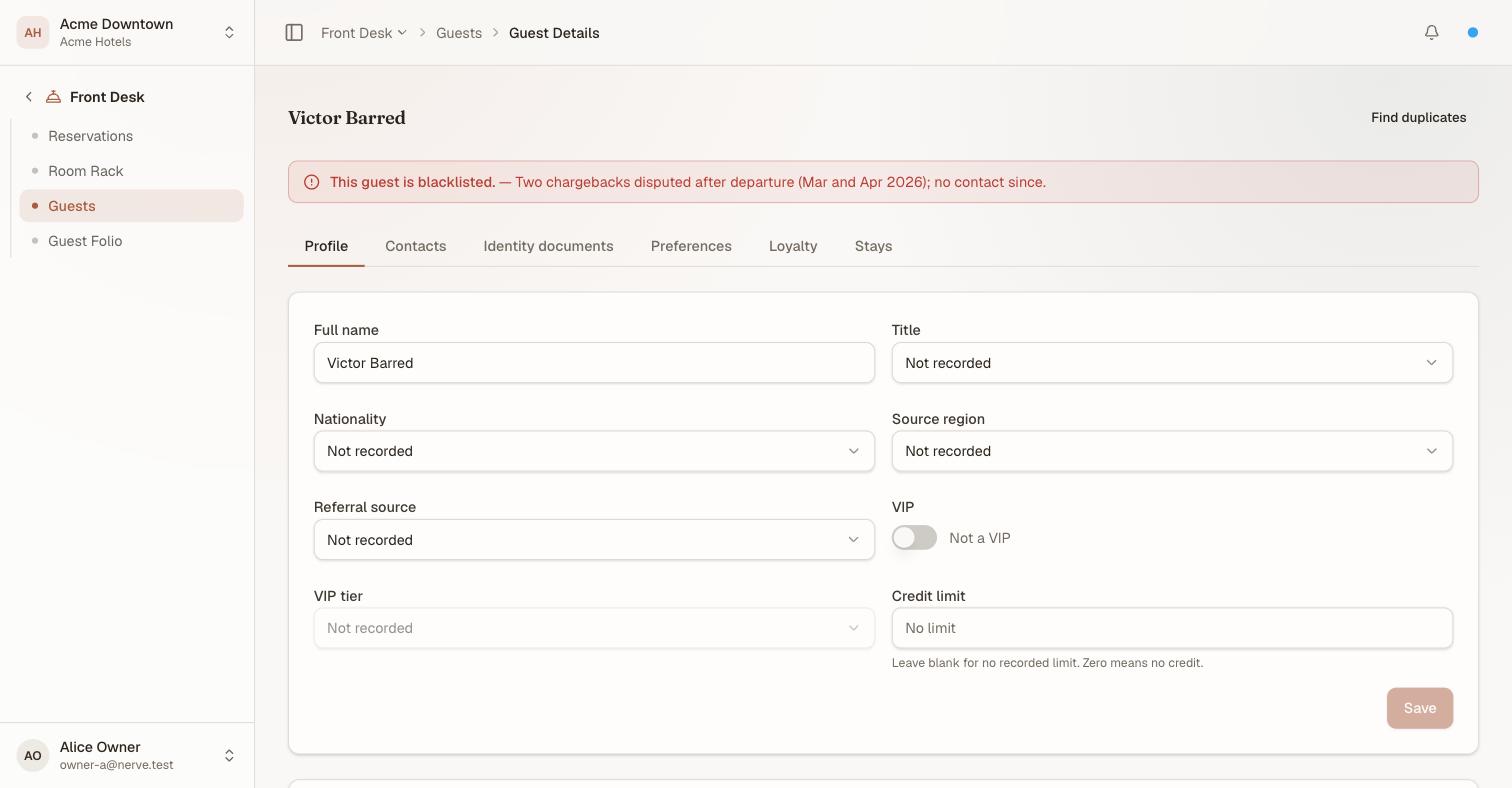
The blacklist banner sits above the tabs, not inside one — it is the first thing anyone opening this profile needs to know, whichever tab they came for.
VIP is a toggle, and VIP tier stays disabled until it is on. The tier says what kind of VIP — VIP, VVIP, Owner's guest, Press / media, Industry partner — because those are handled very differently and one flag cannot carry the difference. A stay for a VIP guest is flagged on the rooming list so the floor knows before arrival.
Credit limit is what this guest may run up before the house wants a decision.
Penting
Blank and zero are different. A blank credit limit means no limit has been recorded;
0means this guest gets no credit at all. The field says so beneath itself, because reading a blank as "zero" would silently refuse credit to every guest nobody had got round to assessing.
Blacklisting a guest#
Blacklist marks a guest the house will not take, with a reason. The reason is not optional in spirit and should not be in practice: "blacklisted" with nothing beside it is a decision nobody can review, defend, or lift with confidence a year later.
Once set, the profile carries a banner above every tab, and the guest carries a Blacklisted badge in the Guests list. Lift the blacklist removes it.
Catatan
A blacklist is a record and a warning, not a wall in the booking flow. It tells the person at the desk what the house has decided; it is on them to act on it. Treat the reason as personal data — it is an allegation about a named individual, and it is subject to the same access and erasure rights as everything else on this profile.
Contacts#
A guest used to have exactly one email address and one phone number, which is the wrong shape for the guests a hotel actually bills. The Contacts tab holds as many as you need, each tagged with what it is for — mobile, work, billing, emergency, or whatever types your property has defined.

One table, one row per entry — including the profile's original email and phone, which read "On the profile" under Used for. They are the same kind of fact, so they are not kept in a separate block.
One contact per kind is the primary: the address a confirmation goes to, the number the desk calls. Use the star to promote another one; marking a new one primary replaces the current one, so you never have to demote the old one first.
Every value is masked, and revealing one is written to the audit log. A fourth phone number is not less personal than the first.
Identity documents#
Record a passport, KTP, KITAS or whatever else your jurisdiction asks for from the Identity documents tab. Each one carries a type, the number, an optional issuing country and an optional expiry date.

The number is never on screen at rest — only its last four characters, which is enough to confirm you are looking at the right document and not enough to reproduce it.
The number is treated as sensitive personal data throughout:
- It is encrypted before it is stored. Nobody reading the database sees it.
- The screen shows only the last four characters.
- Reveal shows the full number, and every reveal is written to the audit log with your name, the property and the document — never the number itself.
Revealing is its own permission, frontdesk.guest.iddoc.reveal, separate from the permission to record a document. Both sit on the Front Desk role by default, because a clerk checking a guest in genuinely needs to read the document back. The split exists so a property that wants the stricter arrangement — the whole shift records documents, only a duty manager reads one back out — can have it by editing the role, without giving up the ability to record.
The same masked form is what the Outstanding Folio report shows in its ID card column: the type and a four-character tail, never the number.
Removing a document is a real delete. Use it to correct a mistyped number, and to satisfy an erasure request.
Scans of the document#
A number is what a clerk reads back over a counter. What most properties are actually required to hold is the document — the photograph of the KTP, the passport page. Expand Scans on any document row to see what is attached, and to add more.

Both sides of a document, because that is how a KTP or a passport is actually captured at a counter. Images or PDF, up to 5 MB each.
Scans get the same treatment the number gets, and a little more, because a photograph of a passport discloses strictly more than the passport number:
- the file is encrypted with the same key as the number, and the list you see above carries only the filename, size and date — never the image;
- opening one needs the same
frontdesk.guest.iddoc.revealpermission, and is written to the audit log as its own event.

The viewer says so on the screen. Looking at a guest's passport photograph is an event, not a page view.
Penting
Delete a scan as soon as the reason you captured it has passed. A retention rule you keep is worth more than an archive you cannot justify.
Preferences#
The Preferences tab is the guest's standing requests — the things a returning guest should not have to ask for twice.

A name and a value, where the value is free text and may run to a paragraph — "after 11:00, she works mornings" is the useful version of "late".
Use Add preference to create one, the pencil to edit, the bin to remove. A preference name is yours to invent: this is not a reference list, because what a house tracks about its regulars is not a vocabulary anybody else can supply.
Changes are recorded on the audit log by name only — what was changed, never what it said. A note about a guest's sleep or diet is personal data, and the audit trail is not the place to copy it.
These are the guest's standing preferences. A request made for one stay lives on the stay — see Guest Preferences for the house-wide view of what is open right now.
Loyalty#
The Loyalty tab records this guest's membership in your property's loyalty programme, if they have one: a Tier (a reference list — see Reference data, the same convention as title or nationality), a Member number, the Joined date, and a Points balance. A guest with nothing recorded here reads "Not enrolled in the loyalty program yet."
The member number is personal data like any other identifier on this profile, and is reachable the same way the rest of the guest's data is for an access, export or erasure request.
Stays#
The Stays tab is this guest's history with the property, and the Guests list summarises it in a column: how many stays are still ahead of them, and how many are behind. A cancelled booking counts as neither — a stay that did not happen is not history.
Merging guests#
When two profiles turn out to be the same person, Find duplicates on the profile finds the candidates. Merging keeps the survivor's details and re-points every stay. Contacts and identity documents stay with the profile they were recorded on — check the survivor after a merge and re-record anything that mattered on the losing profile.
Who can do what#
| Permission | Lets you | Held by default |
|---|---|---|
frontdesk.guest.read |
Open a profile and see it, masked | Front Desk, Manager, Owner |
frontdesk.guest.write |
Edit the profile, contacts, documents, scans and preferences | Front Desk, Manager, Owner |
frontdesk.guest.contact.reveal |
Reveal an email address or phone number | Front Desk, Manager, Owner |
frontdesk.guest.iddoc.reveal |
Reveal a document number, and open a scan | Front Desk, Manager, Owner |
frontdesk.guest.merge |
Merge two profiles | Manager, Owner |
The Read-only role deliberately holds none of these. It can read reservations, but a guest profile is where the personal data is, and "read-only" is not the same as "may see everything".
What's next#
- Reservations — where a stay's own VIP flag and party are set
- Guest preferences — every open request in the house, for the floor
- Reference data — the lists behind the title, nationality, source region, referral source, VIP tier, contact type and loyalty tier dropdowns