Pengaturan
Charge codes, tax and billing setup
Every article the property can post, the groups a revenue report rolls up by, the tax and service rates applied to them, and the routing templates a group applies at billing time.
Terakhir diperbarui
Who this is for: Manager, Accountant and Owner — reading this screen needs
billing.setup.read, changing anything on it needsbilling.setup.manage. Where: Settings → Billing Setup
Four tabs sit behind this one screen, and the first three belong together because they answer one question: what is this charge, and where does the money go? The fourth answers a related one — who pays for it, when it's a group.
| Tab | Holds |
|---|---|
| Charge codes | Every article the property can post |
| Article groups | The two-level hierarchy a revenue report rolls up by |
| Tax & service | The VAT, service charge and levies this property applies |
| Instructions | Named billing-instruction templates a group reservation applies at billing time |
Everything in Nerve that puts money on a folio reaches for a charge code from here. Set it up once and the folio, the revenue report and the ledger already agree — nobody reconciles them afterwards.
Catatan
A new property is not empty. Nerve seeds a starter set the first time the screen is opened: 4 main groups, 10 sub groups, 12 charge codes and 7 cashier purposes, all editable. Nothing you change is ever overwritten by that seed.
Tips
Each tab's explanation now lives behind the info button beside its action, with a link out to this page. The screen gives its space to the table; the reasoning is one click away when you want it.
Article groups come first#
A charge code has to hang off something, so start here.
There are two levels and only two: a sub group hangs off a main group, and a charge code hangs off a sub group. That is not a limitation left over from somewhere — it is the shape a revenue report rolls up by, and a third level would give you a number that no report knows how to total.
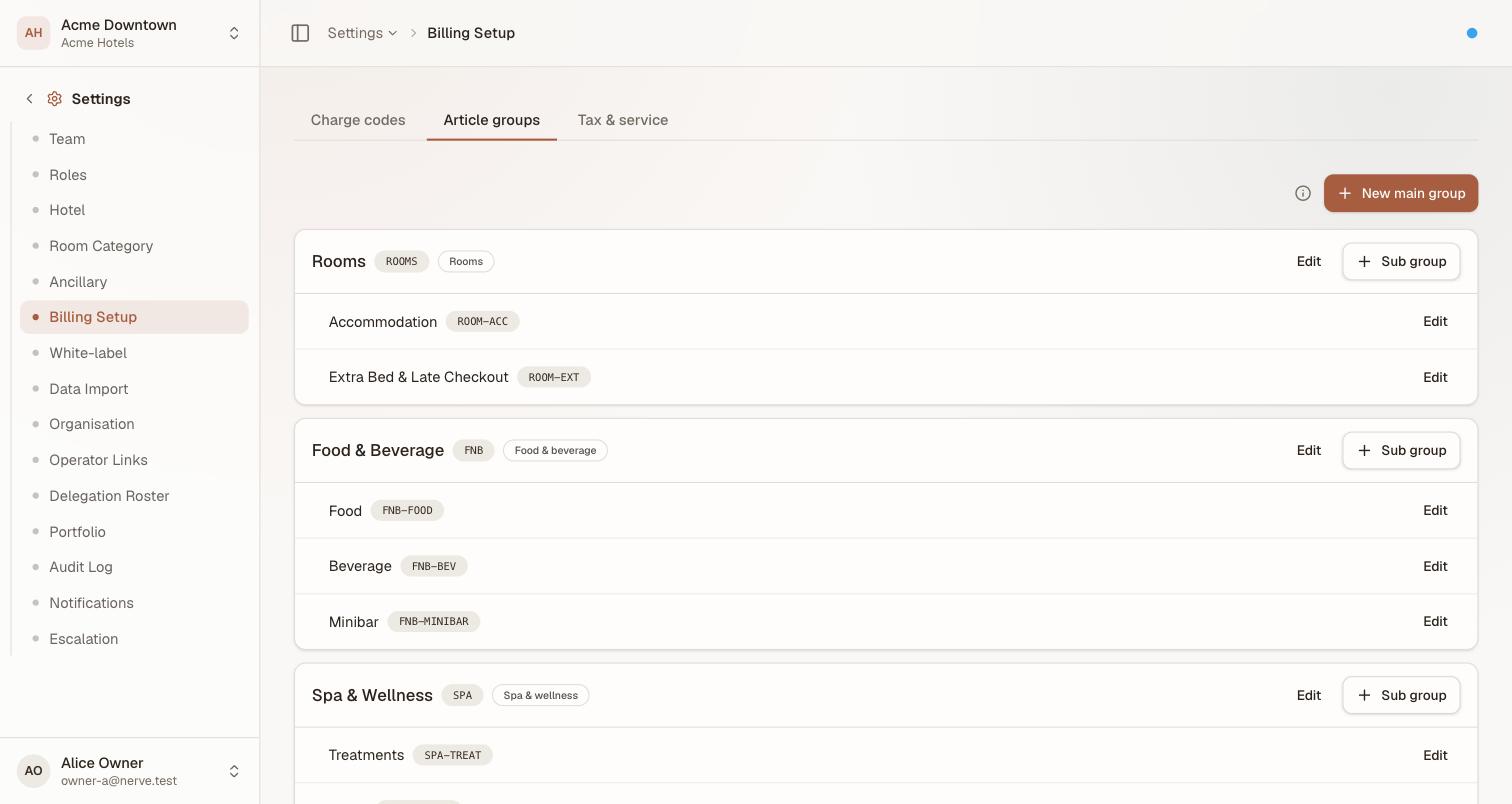
Main group, then sub group. The badge beside each main group is its revenue centre — Rooms, Food & beverage, Spa, Minor operated or Other — which is what a departmental report groups by.
- Select New main group and give it a Code, a Name and a revenue centre.
- Select Sub group on that main group to add a sub group beneath it.
- Charge codes then pick a sub group, never a main group.
Groups are never deleted, only deactivated. A deactivated group stops being offered on new charge codes, and every posting already made against it stays exactly where it is — which is what keeps last year's revenue report readable next year.
Charge codes are the unit of everything#
A charge code is what lets a posting be grouped, taxed consistently, mapped to a general-ledger account and reported on. A free-text description is none of those things — which is why "Miscellaneous, 450" typed onto a folio is a hole in the revenue report rather than a line in it.
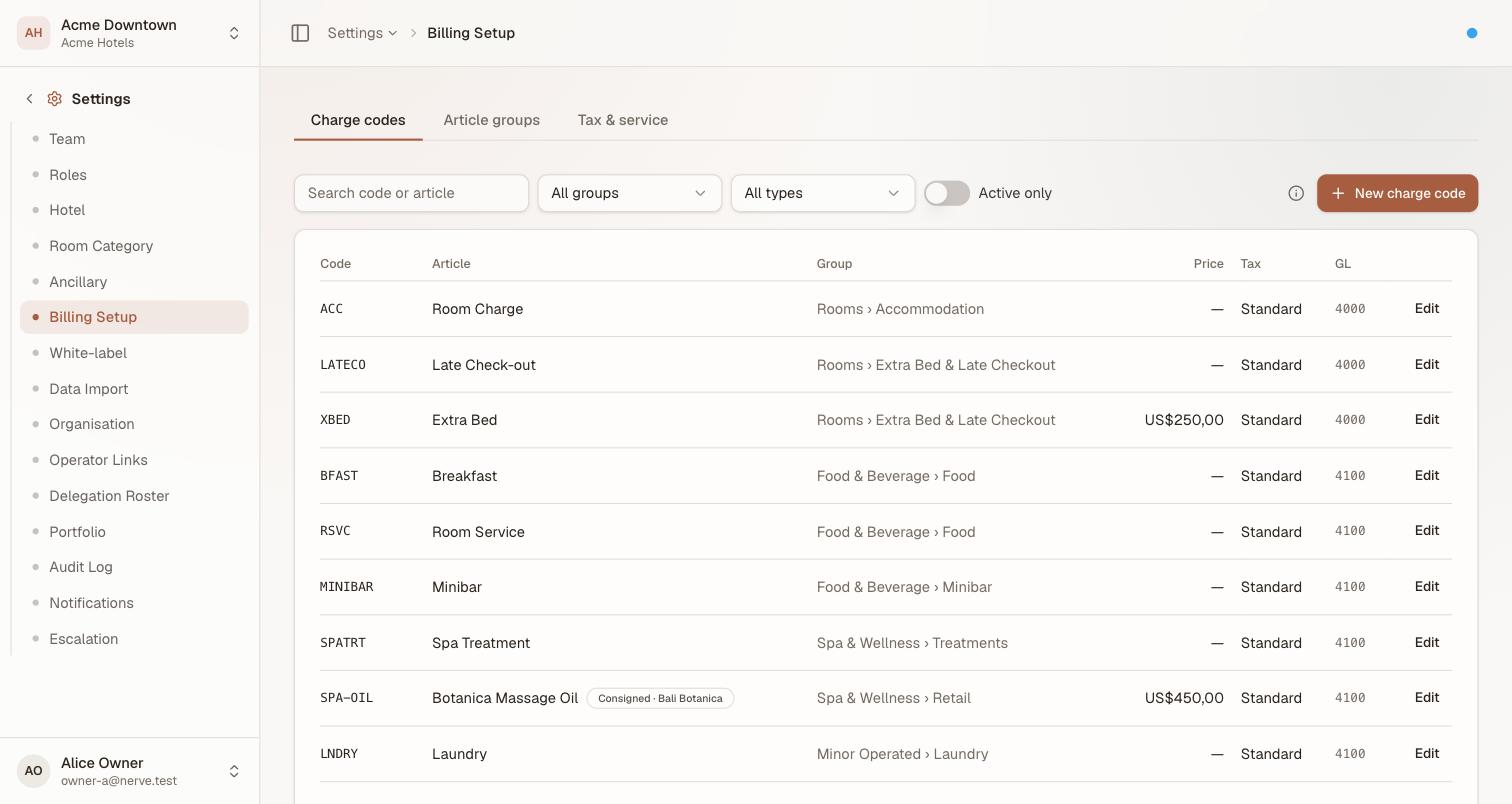
One row per article. Group is the sub group it rolls up under, Price is the default the posting form offers, Tax is the treatment applied, GL is the account the revenue lands on.
Each code carries five decisions:
| Field | What it decides |
|---|---|
| Article group | Which sub group — and therefore which revenue centre — this rolls up under |
| Posting type | room, incidental, adjustment, service_charge or tax. Room charges route to the room folio; adjustments may be negative |
| Tax treatment | standard (every active rate applies), exempt (none do), zero_rated (rates apply at zero and stay visible on the folio) |
| Default price | Pre-filled on the posting form. Optional — leave it empty for anything priced per sale |
| GL account | Where the revenue lands in the chart of accounts |
Tips
Make
Adjustmenttax-exempt and leave it that way. A goodwill credit is not a sale, and re-taxing it hands the guest the tax back twice. The seededADJcode is already exempt for this reason.
Finding a code in a long master#
A real house runs hundreds of articles, so the list filters and pages 25 at a time.
| Control | Narrows to |
|---|---|
| Search | A code or article name containing what you type |
| All groups | One sub group |
| All types | One posting type |
| Active only | Codes still offered on the posting form |
The filters combine, which is what makes them worth having separately: "which Food & Beverage articles are still active?" is a question search alone cannot ask. Clear appears as soon as anything is set.
What the front desk sees#
The clerk posting a charge does not choose a group, a tax treatment or a GL account. They choose the article, and the rest comes with it.

"Rolls up under Retail · Standard" is the setup speaking. The clerk sees the consequence of the code before posting, and can change nothing but the amount and the description.
This is why billing.setup.read is on the Front Desk role: you cannot pick a charge code you are not allowed to see. It is read-only there — a clerk uses the master, never edits it.
Tax and service charge#
A rate has a code, a kind (vat, service or levy), a rate, a basis and an order.
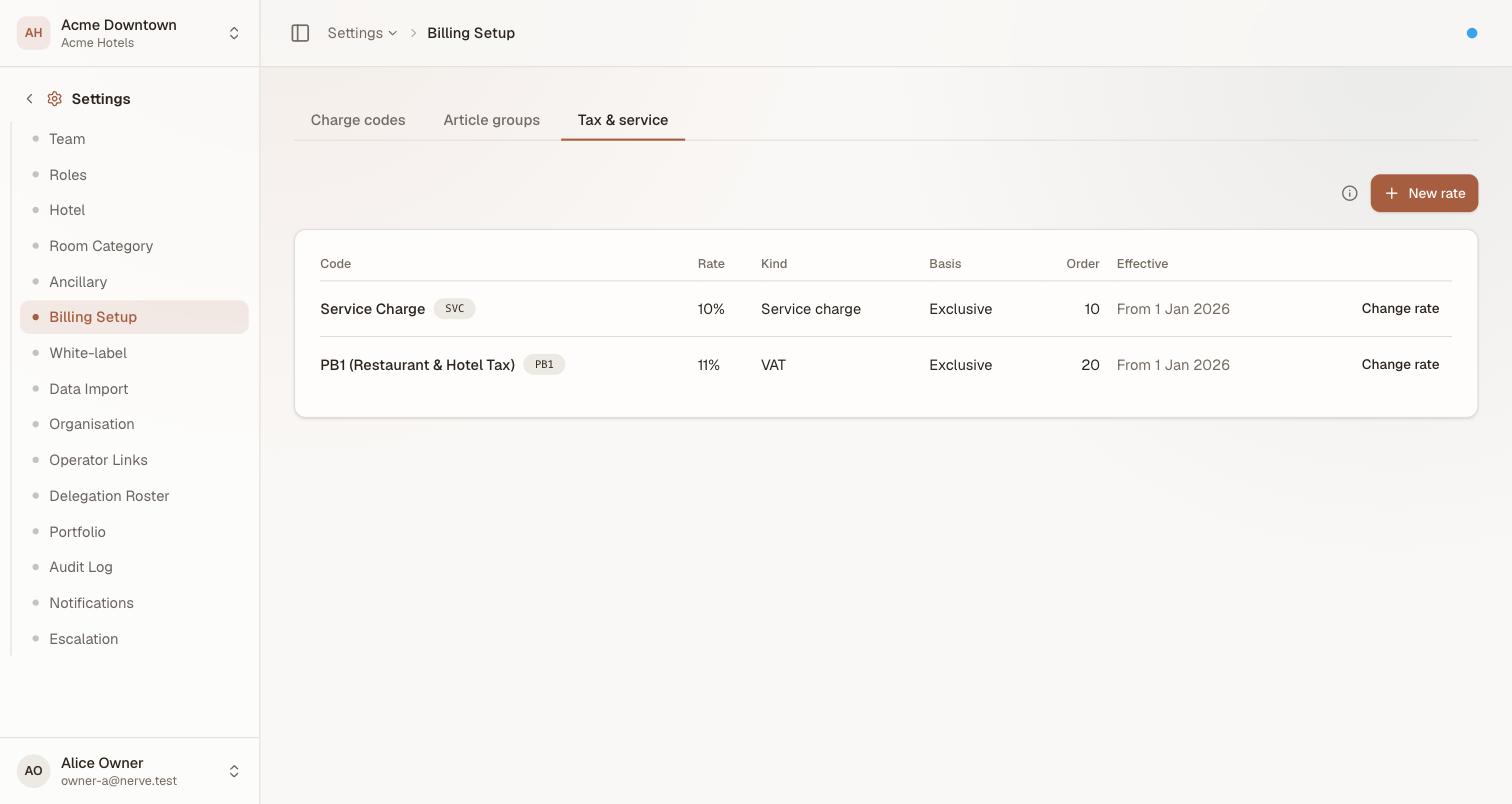
The order is the whole story of the Indonesian 10 + 11: service charge at order 10, tax at order 20, so PB1 is charged on the article plus the service charge, not on the article alone.
Basis decides where the money already is:
- Exclusive — the rate is added on top of the price. A US$450 article becomes US$450 + tax on the folio.
- Inclusive — the rate is already inside the price the guest was quoted. The guest total does not move; the tax is reclassified out of revenue into the tax liability, which is what USALI requires and what a rate-card that says "nett" actually means.
Order decides compounding. Rates are applied in ascending order, and each one is charged on the article plus everything already applied before it.
Changing a rate#
You cannot edit a rate in place, and the screen offers Change rate rather than an edit for that reason. Editing a live rate would restate every folio it has already priced, including settled and invoiced ones.
- Select Change rate on the rule.
- Enter the new rate and the date it starts.
- Nerve closes the current rule on that date and opens a new one from it.
The new date must be after the current rule's start date; anything else is refused. Every folio priced under the old rate keeps the old rate, forever.
Penting
A rate change is dated, not immediate. If a levy rises on 1 September, enter it in August with 1 September as the start date. Waiting until the first of the month and changing it "now" leaves every posting made that morning on the old rate, and there is no way to re-price them afterwards.
What lands on the folio#
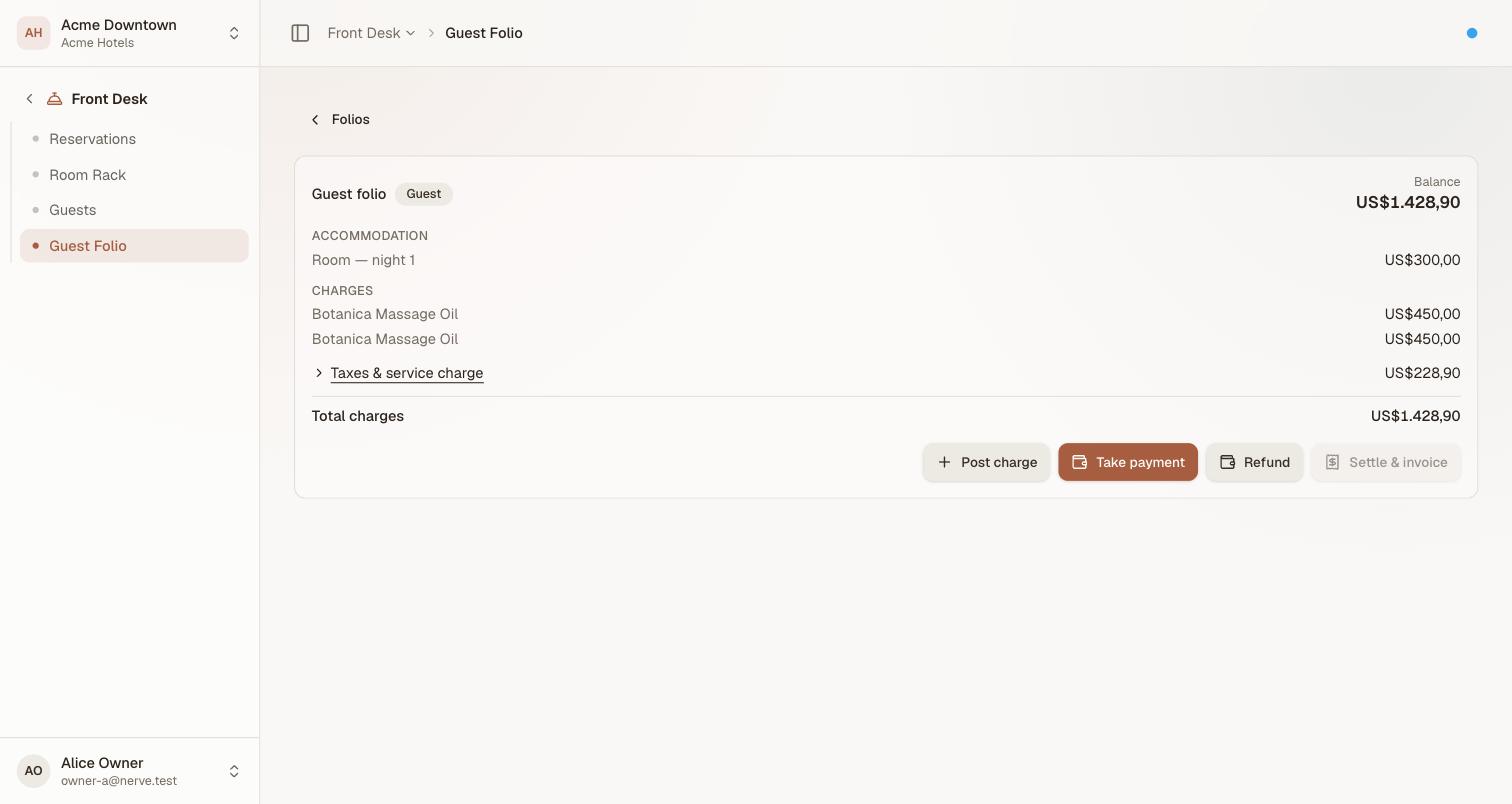
The folio groups charges by what they are and folds every tax and service-charge line into one figure. The arrow opens the breakdown — each rule as its own line — so a guest disputing the total can still be shown exactly which rule produced which amount.
A US$450 article at these rates produces US$45 service charge (10% of 450) and US$54.45 tax (11% of 450 + 45). Both are real, separate postings; the folio simply presents them as one line until you ask.
Instructions#
The Instructions tab holds named, reusable routing instructions for a group reservation — "company pays room & tax, guest pays extras", say — so the desk does not re-pick the same split by hand on every group that arrives under the same arrangement.
- Select New template and give it a Name.
- Choose which posting types it routes to the master: room, tax, service charge, incidental, adjustment.
- Save.
A template's own row carries a Deactivate switch and an Edit, same as a charge code. It does nothing on its own until a group applies it — see applying a template from Group binders. Applying copies the routing onto the group at that moment; editing a template afterwards never reaches back and alters a routing a group already applied.
Consignment articles#
Stock the hotel sells but does not own is still configured here, on the charge code: turn on consignment, choose the consignor, and set the split.
The consignor record and what each one is owed live elsewhere, because neither is a pricing decision:
| What | Where |
|---|---|
| The consignor record | Inventory → Suppliers → Consignors |
| What each is owed | Accounting → Consignment |
See Consignment settlement for both.
Who can do what#
| Permission | Lets you | Held by default |
|---|---|---|
billing.setup.read |
See the charge codes, groups, rates and instruction templates — and pick a code when posting | Manager, Accountant, Front Desk, Read-only |
billing.setup.manage |
Create and change all four tabs, and the consignor records | Manager, Accountant |
frontdesk.folio.transfer |
Apply an instruction template to a group, from Group binders — a separate permission from managing the templates themselves | Front Desk, Manager |
billing.cashier.record |
Run the general cashier — a separate job from this screen | Manager, Accountant |
The split is deliberate: the front desk posts against the master all day and applies a template at billing time, but cannot define one — which is what keeps the revenue report meaning the same thing in December as it did in January.
What's next#
- Group bookings and master-folio routing — applying a template, and routing a stay by hand
- Consignment settlement — consignors, and what the house owes them
- The general cashier — house cash that is not a guest payment
- The ledger — where a coded charge lands once it is posted
- Folios and charges — posting against these codes at the desk