การตั้งค่า
Agent runs, spend & limits
Every background model call the platform makes on your behalf: what it did step by step, what it stopped to ask you, and what it cost against your plan.
อัปเดตล่าสุด
Who this is for: Owner — requires
core.agent.read. Where: Settings → Agent Runs
Some things in Nerve run on their own — a Protocols classification loop, a mined play candidate, a submitted job. Each is an agent run: a durable loop with a journal, a budget, and a way to stop and ask a person.
This screen is where you watch all of it. Nothing here is a black box by design — if a model did something on your property's behalf, it is on this page.
Three tabs: Runs, Attention and Spend & limits.
หมายเหตุ
Agent Runs appears once the agentic runtime is switched on for your organisation. Until then the surface is not there, which is the intended pre-launch state rather than a fault.
Runs#
One row per run, each with its status, the tokens it consumed and the number of tool calls it made.
| Status | Meaning |
|---|---|
| Pending | Minted, not started |
| Running | Working |
| Waiting | Stopped for a person — see Attention |
| Succeeded | Finished with a result |
| Failed | Finished with an error |
| Halted | Stopped deliberately — a budget ceiling, a kill switch |
| Expired | Its deadline passed |
Halted is not failed. A run that hit its token ceiling and stopped did exactly what it was told to do. It is separated out so that hitting a limit reads as a limit rather than as a bug.
An empty list reads "A run is minted when a change clears one of your salience rules. Nothing has cleared one yet." — which is a statement about your property, not about the feature being unavailable.
The journal#
Opening a run shows every step it took, in order and typed:
| Step | What happened |
|---|---|
| Model | A model was asked something |
| Tool | A capability was called |
| World view | It read the state of the property |
| Interrupt | It stopped to ask a person |
| Clock | It read the time |
| Random | It drew a random value |
| Cache | A previous identical step was reused |
Clock and random being journaled steps is the detail that makes the rest trustworthy. A loop that reads the wall clock or rolls a die is not reproducible unless those readings are recorded too — with them on the journal, a run can be replayed and will make the same decisions, which is what "durable" is actually claiming. Cache hits are marked, so a resumed run is visibly resuming rather than quietly redoing work you already paid for.
Attention#
Where runs stop and wait for a person, with a deadline.
Two kinds, and the difference matters:
- Confirmation — "I am about to do this, confirm."
- Approval — "This is outside what I may decide, approve it."
You Approve or Reject. An interrupt is pending, answered, escalated, or expired — and an expired one is a real outcome, not a lost message: the run stopped rather than proceeding without you. Nothing here proceeds on a timeout.
Two further panels sit on this same tab, below the interrupts:
Decisions — why the runtime chose to act, or not to. Each decision is fired, suppressed or coalesced. Coalesced is the interesting one: several triggers that would have produced near-identical work are collapsed into one run rather than each minting their own. Suppressed and coalesced entries are shown, not hidden — the times the runtime decided not to do something are as much a part of understanding its behaviour as the times it did.
Subscriptions — which event streams the runtime is following and where its cursor has reached. This is the first place to look if a loop seems to have gone quiet.
Spend & limits#
This tab is the money.
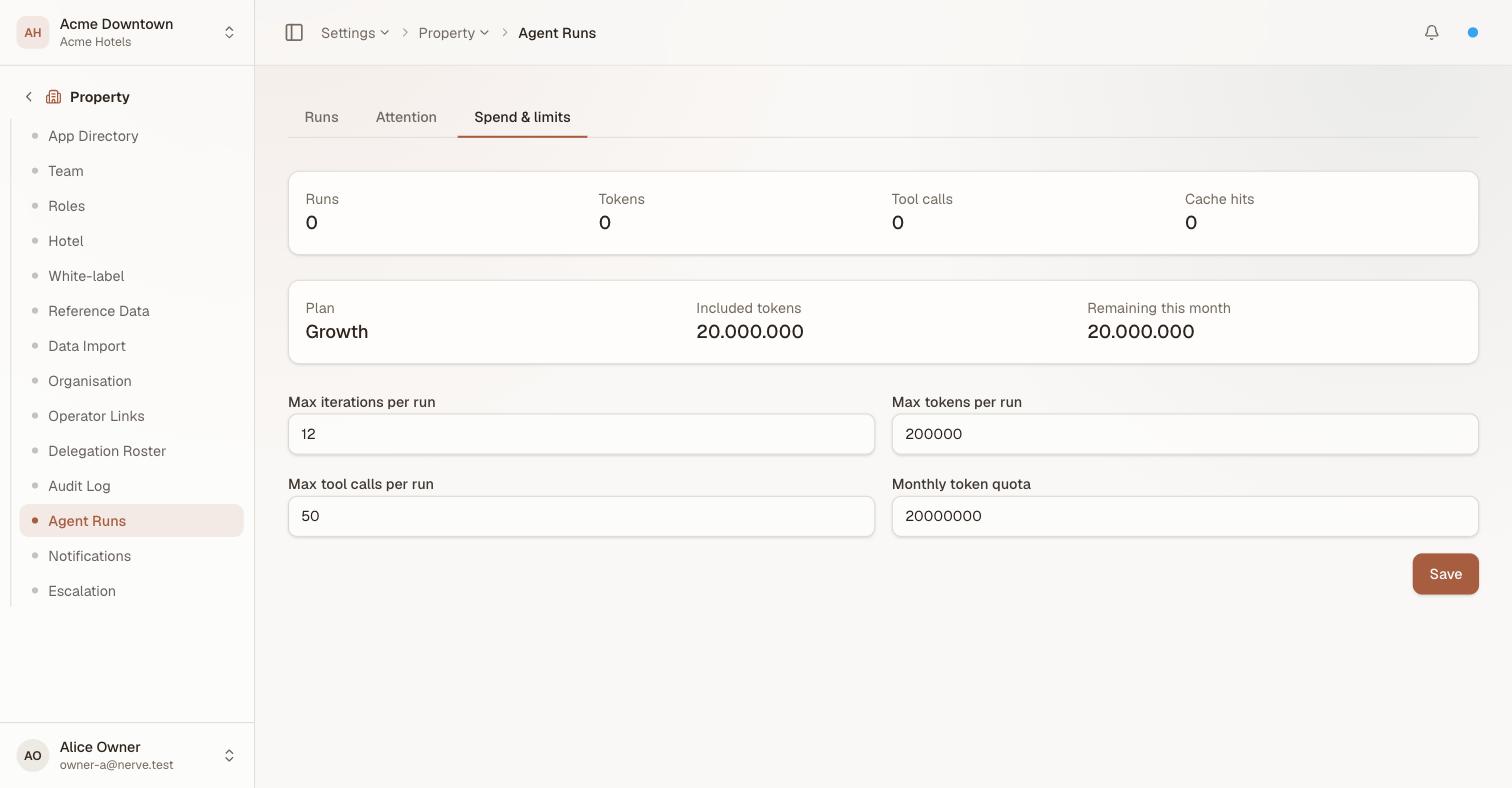
The period's consumption across the top, the plan's allowance beneath it, and your own ceilings below that — which are the ones you can actually edit.
Your plan's allowance#
| Shown | What it is |
|---|---|
| Plan | The plan the allowance comes from |
| Included tokens | What the plan covers each month |
| Remaining this month | What is left of it |
A plan without a metered ceiling shows No plan limit.
Usage past the included allowance appears on your invoice as a usage overage line, itemised separately from the subscription and quoting the tokens and the per-1,000 rate — so the total is always the sum of lines you can check rather than one number to take on faith.
Your own ceilings#
Separately from the plan, you can set your own limits:
- Monthly token quota
- Max tokens per run
- Max tool calls per run
- Max iterations per run
These are yours to tighten. You can lower your budget below the plan allowance; you cannot raise it above. The per-run ceilings are the ones worth setting even if you are comfortable with the monthly figure — they are what bounds a single loop that has misunderstood its task, and they turn that into a halted run rather than a month's budget.
If spend is paused#
Spend can be paused for an organisation, and when it is, this tab says so with the reason. No new runs are minted while a pause is in effect.
A pause stops future spend. It does not erase history: past runs, their journals and the charges already accrued are unchanged. Resuming clears the pause and its reason together.
Everything here is also in the audit log#
Background model calls ride the same trail as human actions — one entry per metered run, alongside every pause and resume with its actor and reason. There is no separate AI log. See Audit log.
What is recorded about a run is the model, the token counts, the cost and a digest of the ask — never the prompt itself.
What's next#
- Protocols — the main thing these runs are doing.
- MCP agents — jobs, which execute as agent runs.
- Audit log — the shared trail.