บัญชี
Accounting overview and the chart of accounts
Folio activity posts to the ledger by itself. What the back office is for, who works in it, and the chart of accounts every figure lands in.
อัปเดตล่าสุด
Who this is for: Accountant and Owner — reading the books requires
backoffice.ledger.read, which the Manager and Read-only bundles also carry. Everything that writes here does not. Where: Accounting
Accounting is the back office. The front desk posts charges and takes payments all day; this module is what that produces — a balanced double-entry ledger, supplier bills that must be approved before they can be paid, company and OTA balances that have to reconcile, the nightly close that rolls the business date, and the reports the owner reads.
The first thing to know is what you do not do here. Folio activity posts to the ledger by itself. A charge on a folio raises its own balanced journal entry in the same moment the charge is posted; a payment raises another. Nobody re-keys the front desk's day, and the ledger is read-only for exactly that reason. The ledger traces one seeded charge from the folio to the entry it produced.
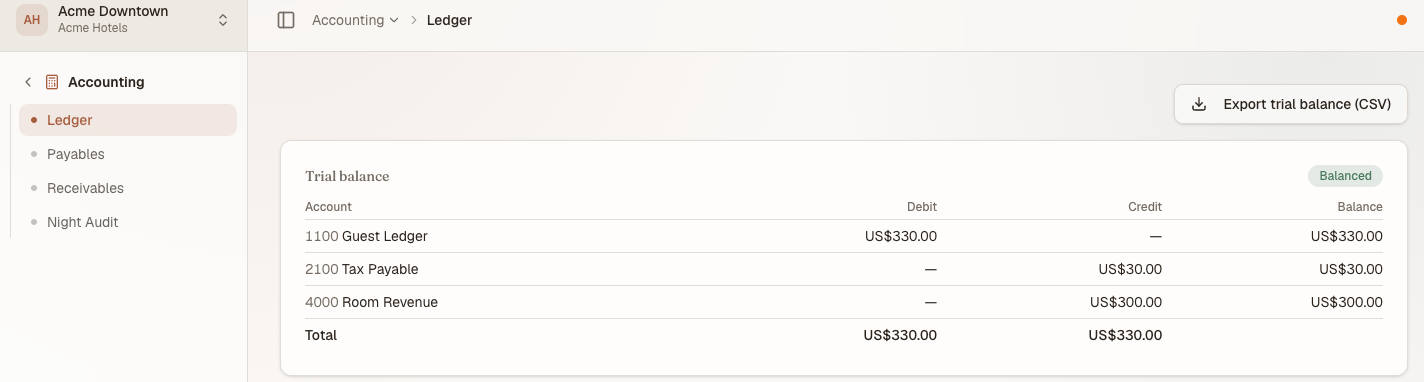
Four screens and one book. The accounts down the left of the trial balance are the chart of accounts, as far as this property has posted to it.
หมายเหตุ
This section uses the default terminology. Your house may have renamed these terms under Settings → White-label.
Who works here#
Accountant is a default role bundle, not a separate product. Someone holding it sees Ledger, Payables, Receivables and Night Audit, plus read-only Reservations — and nothing else.
| Role | Can | Cannot |
|---|---|---|
| Owner | Everything | — |
| Accountant | Read the ledger; enter, approve and pay bills; manage receivables and remittances; run the night audit; add, deactivate and reveal settlement bank accounts; run the Fixed Asset Register | Reach any other module beyond read-only Reservations |
| Manager | Read the ledger and the trial balance; add, deactivate and reveal settlement bank accounts; run the Fixed Asset Register | Payables, receivables, the night audit |
| Read-only | Read the ledger, the trial balance and the Fixed Asset Register | Any change, including settlement bank accounts — Read-only does not carry backoffice.bankaccount.read |
Two things have to line up before any of it appears: the permission, and the Accounting app being enabled on the property. A permission you hold on an app that is switched off still shows you nothing — see why your menu differs from a colleague's. Roles are configurable per organisation; roles and what each one can do is the reference.
Note that approving a bill is a different permission from entering one (backoffice.ap.approve against backoffice.ap.create). The default Accountant bundle happens to carry both, which is why the split is easy to miss until someone builds a custom role. Accounts payable is where that matters.
Similarly, revealing a bank account's full number is a separate permission from reading or managing the list (backoffice.bankaccount.reveal). The default Accountant and Manager bundles carry all three; a narrower role can work with masked accounts without ever being able to decrypt one. Settlement bank accounts covers the reveal audit trail.
The chart of accounts#
Every organisation gets a working chart the first time its books are read. It is per organisation, not per property — two hotels under one owner post into the same accounts, and each journal entry carries the property it belongs to.
| Code | Account | Type | What lands in it |
|---|---|---|---|
1000 |
Cash & Bank | asset | Money actually received: folio payments, bill payments out, remittances in |
1100 |
Guest Ledger | asset | What in-house guests owe. Every folio charge debits it; every payment clears it |
1200 |
City Ledger | asset | What companies and OTAs owe. A receivable moves the balance here from 1100 |
1300 |
Inventory | asset | Stock on hand, from the Inventory module |
1500 |
Fixed Assets | asset | What a registered fixed asset cost, at acquisition |
1590 |
Accumulated Depreciation | asset (contra) | Depreciation posted against fixed assets so far |
2000 |
Accounts Payable | liability | Supplier bills you have approved but not yet paid |
2100 |
Tax Payable | liability | Tax charged to guests and owed onward |
3000 |
Owner's Equity | equity | Opening balances and owner capital |
4000 |
Room Revenue | revenue | Room charges |
4050 |
Service Charge Revenue | revenue | The service charge, where the house levies one |
4100 |
Other Revenue | revenue | Incidentals, and direct point-of-sale takings |
4900 |
Gain/Loss on Disposal of Fixed Assets | revenue | The plug between a disposed asset's proceeds and its net book value |
5000 |
Operating Expenses | expense | Approved supplier bills |
5100 |
Cost of Goods Sold | expense | Stock consumed, and stock-count shrinkage |
5200 |
Depreciation Expense | expense | A period's depreciation, from the Fixed Asset Register |
These sixteen are system accounts: the posting rules name them by code, so they cannot be removed. An organisation may add its own codes alongside them, in any of the five types — asset, liability, equity, revenue, expense.
In the app the chart is what you read down the left of the trial balance on the Ledger screen. Only accounts that have been posted to appear there, so a fresh property shows a short list that grows as the house trades.
หมายเหตุ
Chart-of-accounts management has no screen of its own yet. Settlement bank accounts is built with a second, placeholder tab reserved for it — today the chart above is fixed plus whatever codes exist in the data.
What's in this section#
- The ledger — the trial balance, the journal, and how a folio charge becomes an entry.
backoffice.ledger.read - Accounts payable — vendors, bills, the approval gate, AP aging.
backoffice.ap.create,backoffice.ap.approve - Accounts receivable and the city ledger — company and OTA balances, remittances, AR aging.
backoffice.ar.manage - Settlement bank accounts — the accounts payouts and refunds move through, masked by default.
backoffice.bankaccount.read - The Fixed Asset Register — registering, depreciating and disposing of fixed assets.
assets.register.read - Running the night audit — closing the day and rolling the business date.
backoffice.nightaudit.run - Daily and period reports — the day's revenue, the trial balance, the CSV export.
backoffice.ledger.read
How it connects#
The front desk feeds the ledger. A room charge, a tax line, an incidental, a payment and a refund each post an entry of their own — see folios and taking payments and issuing refunds for the screens that produce them.
Company and OTA balances land in Receivables. A stay routed to a company account produces a balance that the city ledger carries rather than the desk collecting it. Group bookings and master-folio routing is where routing is decided; accounts receivable is where the balance is recorded and cleared.
Point of Sale posts only what the folio has not already posted. A check charged to a room reaches the books through the guest's folio, exactly like any other incidental. A check settled at the outlet — cash or card, no room attached — is the one that books here directly, as cash against other revenue and tax.
Inventory posts cost, not revenue. Consuming stock and writing off a count variance both move value out of 1300 into 5100; a count that finds more than expected moves it back.
The Fixed Asset Register posts depreciation and disposal, not acquisition. Registering an asset records its cost here but does not yet raise a journal entry for the purchase; running depreciation and disposing of an asset are what post, against the three accounts above. See the Fixed Asset Register for the scope of that gap.
The night audit closes the day the rest of the house is working in. Rolling the business date is what makes tomorrow's arrivals list tomorrow's — which is why it is documented as its own page rather than as a button.