前台
Check a guest in
Find today's arrivals, run guided check-in with a deposit, and clear the room-readiness gate.
最后更新
Who this is for: Front Desk, Manager, Owner — requires
frontdesk.checkin. Where: Front Desk → Reservations → open the booking
Check-in is an action on one stay, so it lives on that stay — on the booking's own page, next to the guest, the room and the balance. There is no separate arrivals screen: the reservations table's Check-in date filter answers "who is arriving today", and the booking you open from it is where you act.
Find today's arrivals#
- Open Front Desk → Reservations.
- Set Filter dates by to Check-in date.
- Put today in From and To.
That is your arrivals sheet: every booking due to arrive, with its room and its status. Select a booking code to open it.
提示
A room has to be assigned before a guest can occupy it, but you do not have to do it first — the guided check-in assigns one for you if the stay has none. Assigning ahead of the rush is what the room rack is for.
Check a guest in#
- Open the booking and find the stay. A confirmed stay offers Check in.
- Select Check in. The guided flow opens over the page.
- Verify the guest's details against their ID.
- Confirm the room. If none is assigned, choose one from the free rooms offered.
- Take a deposit, if the rate or the house requires one.
- Select Check in.
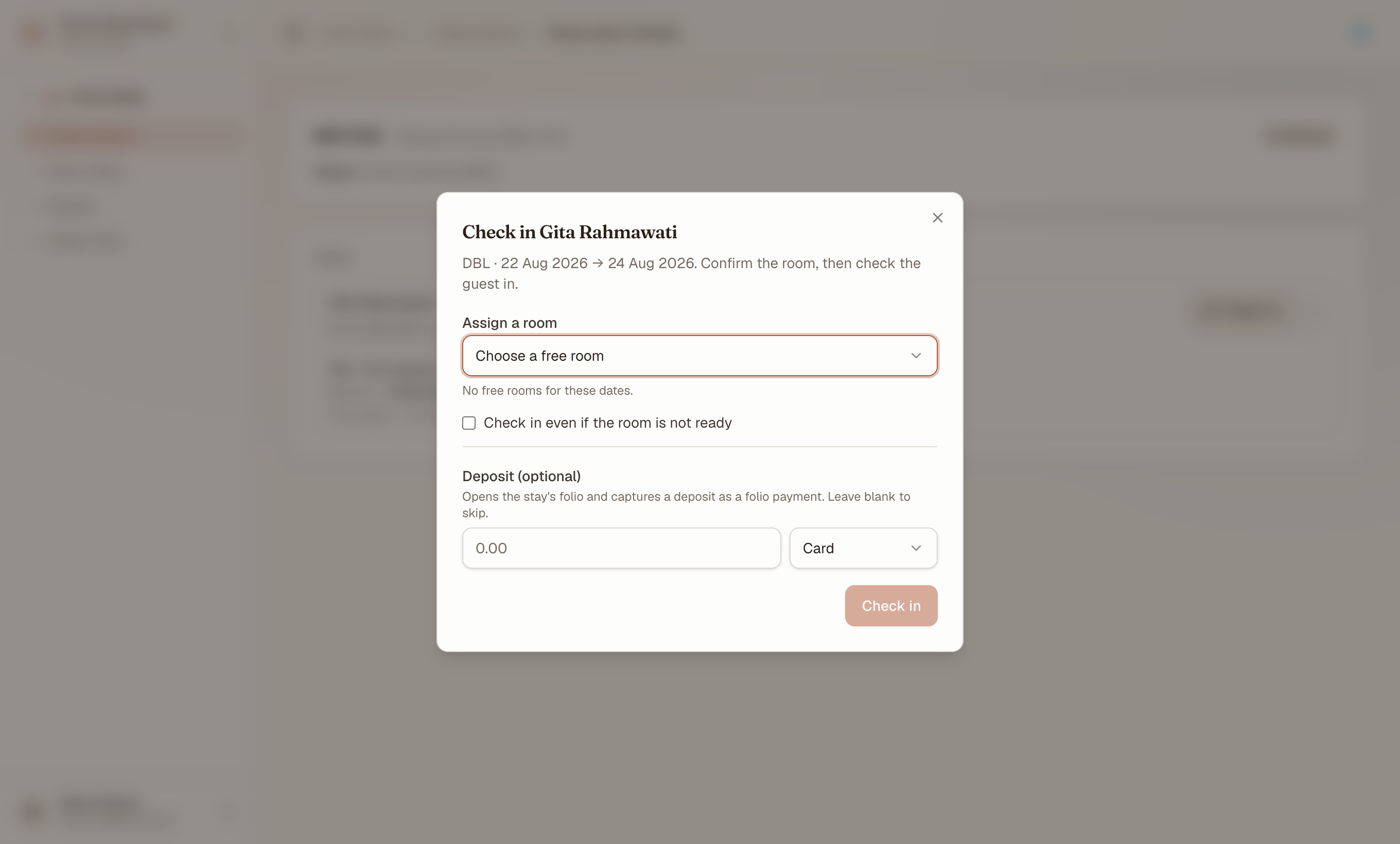
The guided check-in states the room and its readiness before you commit, so the decision is in front of you rather than behind a later error. The deposit is optional; the override is not ticked by default.
The stay moves to in-house, the room shows occupied, and a folio opens with the room and tax postings already on it. A deposit is recorded on that folio as a payment, so the balance is charges minus deposit from the first moment.
注意
On staging, a card payment is recorded against the folio without a real authorisation — no gateway is wired. In production the gateway responds before the payment posts, and a decline stops the flow. Never enter a real card number on staging.
Check in when the room is not ready#
With check-in requires ready room switched on for the property, a room that Housekeeping has not marked ready blocks the check-in.
- Attempt the check-in as above. It stops, and says the room is not ready.
- Either pick a different ready room, or
- Tick Check in even if the room is not ready, the explicit override in the flow.
重要
The override is per action, not a setting. It is recorded, and it does not change the policy for the next check-in. If you find yourself overriding every arrival, the policy is the thing to revisit — not the button.
Assignment itself is never gated. You can always put a stay on a dirty room; it is the check-in that waits. Readiness and the check-in gate covers the whole loop, including how a change on the floor reaches this screen without a refresh.
Check in a guest with no reservation#
A walk-in is one flow rather than two: Walk-in, beside New reservation on the reservations screen, creates the guest, the reservation and an already-in-house stay together. See walk-ins.
What's next#
- Create, find, change and cancel a reservation — the table and the booking page this starts from
- Folios: post, split and transfer charges — post a charge, split a bill, transfer a line
- Check a guest out — the balance gate on departure
- Readiness and the check-in gate — the Housekeeping side of the gate