Kế toán
Accounts receivable and the city ledger
Company, OTA and government balances: recording what is owed, setting a credit limit, reconciling a remittance against it, and reading AR aging.
Cập nhật lần cuối
Who this is for: Accountant and Owner — requires
backoffice.ar.manage. Where: Accounting → Receivables
Receivables is what is owed to the hotel by somebody who is not standing in the lobby: a company whose staff stayed on account, an OTA that collected from the guest and will remit later, or a government body settling an institutional booking.
The account company and OTA balances sit in is the city ledger (1200) — the traditional name for balances that have left the guest ledger but not yet turned into cash. Government balances have their own account (see below). A receivable is the record of one such balance; a remittance is the money finally arriving.
Where a receivable comes from#
Two ways.
You record it here. The normal route today, and what the rest of this page is about.
A settlement raises it. When a folio routed to a company or OTA account is settled while still carrying a balance, Nerve opens the matching receivable itself — same counterparty, referenced by the invoice number the settlement produced — and posts the reclass: 1200 City Ledger debited, 1100 Guest Ledger credited. The charge stops being owed by the guest and starts being owed by the company. It is keyed on the invoice, so one settlement can never raise two receivables.
Ghi chú
Settling any folio at the front desk currently requires a zero balance, an account folio included: Settle & invoice stays disabled until the folio clears. A folio that has reached zero has no balance left to carry, so in practice the automatic raise does not fire from the Folios & Billing screen today. Record the company balance here instead — the receivable behaves identically either way.
Nothing is double-counted on either route, because the revenue was already booked when the underlying charge posted. The entry only moves who owes it.
Group bookings and master-folio routing is the front-desk side of this — routing is what decides whose account a stay's charges belong to in the first place.
Record a receivable#
- Select New receivable.
- Choose the Kind: Company (city ledger), OTA, or Government.
- Enter the Counterparty — the company, channel or institution name.
- Enter a Reference if you have one: an invoice number, a booking reference, a statement line.
- Enter the Amount.
- Select Create receivable.

Kind is what the ledger reads — it decides which account the balance lands on, and the counterparty is how you will find it again when the money arrives.
It opens as open and posts the reclass described above. Read the amount back off the row before you move on — the row is what the ledger took.
Thận trọng
A receivable credits the guest ledger, so record only balances that were on a folio. The reclass assumes the money is moving off
1100— which it is, for a stay that was billed to a company. Record one for a balance that never sat on a folio, such as an opening balance for a company account you are migrating in, and the receivable account will be right while1100goes negative by the same amount. Opening balances belong in onboarding, not here.
Government balances sit on their own account#
A Government receivable debits Government Ledger (1250), not City Ledger (1200). An institutional balance is a different kind of debtor with a different collection cycle, and giving it its own account means the city ledger keeps meaning what it has always meant.
Two things follow, and both are visible on this screen:
- The aging panels show a separate Government strip alongside Company and OTA. The combined total is unchanged; it is simply broken out, so an institutional balance ages in its own bands.
- A remittance only clears its own kind. Select a government receivable while reconciling a company remittance and the government line is not cleared. The ledger account credited has to be the one the balance actually sat on, and a remittance that reached across would credit the wrong account.
Set a credit limit#
Above the list, Accounts and credit limits carries one row per counterparty and currency, showing what that account currently owes and the limit it is held to.
Click an account to set its limit. Leave the field empty for no limit.
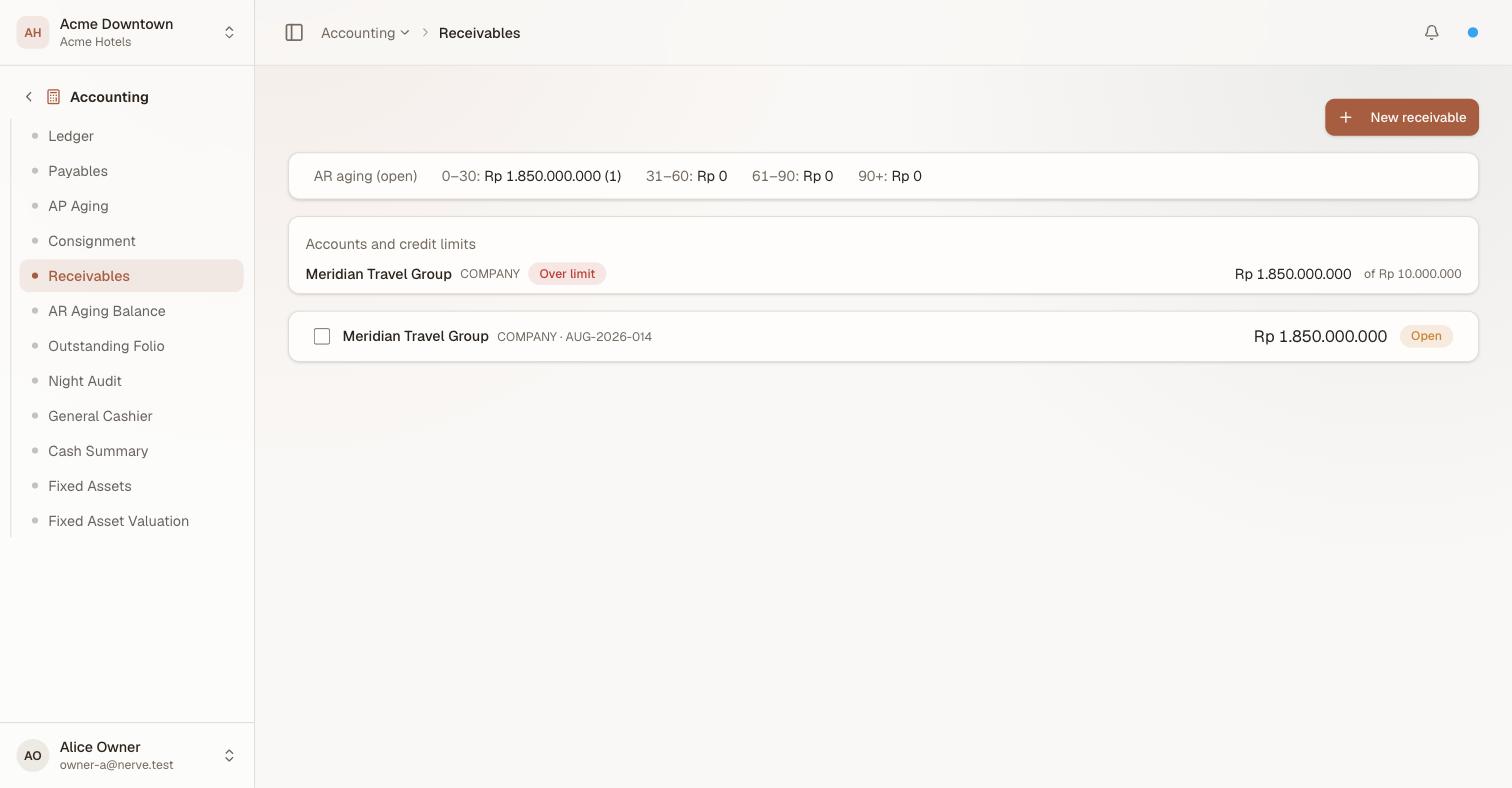
An account past the limit it was given. The flag is on the account, not on any one balance — it is the relationship that is over-extended.
An account whose outstanding balance exceeds its limit is flagged Over limit immediately, here and on the AR aging balance report. Raise the limit above the balance, or clear the field, and the flag goes — an account with no limit set never reads as over its limit, because there is nothing to be over.
Ghi chú
The limit is in the account's own currency and is never converted. A counterparty that owes you in two currencies is two rows with two limits, because a single limit spanning currencies would need an exchange rate the report does not have.
Record a remittance#
A remittance is the payout arriving — the OTA's fortnightly transfer, the company settling its statement. Reconciling it clears the receivables it covers.
- Tick the checkbox on each open receivable the payment covers.
- Check the running total in the bar that appears — it names how many rows you selected and what they add up to.
- Select Record remittance.

Tick what the payout covers and the bar totals it for you. Check that total against the remittance advice before recording it — clearing is per receivable and in full.
The selected rows turn cleared, a remittance is recorded for the total, and the ledger posts 1000 Cash & Bank debited, the receivable account credited. Cleared rows stay in the list as history; they lose their checkbox and drop out of aging.

The two cleared rows stay as history but leave aging. What is left is the company balance nobody has paid yet — which is the number the strip exists to show you.
Quan trọng
Select one counterparty at a time. The remittance is filed under the counterparty and kind of the first row you ticked. Mixing two companies into one remittance clears both balances but records the money against one name, which is a reconciliation you will have to unpick by hand later.
One currency at a time, too. Select receivables in two different currencies and the remittance is refused outright: there is no exchange rate here to convert with, so a single payment cannot settle both.
A partial remittance#
Reconciliation works per receivable, in full — there is no part-clearing a single balance. A remittance that does not cover everything outstanding is therefore modelled by selecting only what it does cover:
An OTA owes you three balances of US$17,500.00, US$9,000.00 and US$4,000.00, and remits US$26,500.00. Tick the first two, record the remittance, and you are left with:
| Receivable | Status |
|---|---|
| US$17,500.00 | cleared |
| US$9,000.00 | cleared |
| US$4,000.00 | open |
AR aging then shows US$4,000.00 outstanding, aged from the day that receivable was raised. If the remittance instead splits a single balance — they paid US$10,000.00 against the US$17,500.00 line — leave that line open and record the difference when the rest arrives. Clearing it early would put US$17,500.00 of cash into 1000 that never arrived.
Read AR aging#
The strip above the list buckets open receivables — cleared ones are gone from it — into the usual bands: 0–30, 31–60, 61–90, 90+, each with a total and a count.

Three open balances, one company and two OTA. Every open row carries a checkbox; that is what a remittance is reconciled against.
Age is measured from the day the receivable was raised, not from an invoice due date. Read a growing 61–90 as a channel or a company that has stopped paying on its usual cycle.
The strip is hidden entirely when nothing is open.
The strip answers "what is on my desk today". For the period-end question — what each account owed on a given date, per currency, with credit limits alongside — use AR aging balance, which is a report with its own as-of date and a print layout.
What's next#
- AR aging balance — the standalone, as-of-date report
- The ledger — the
1200City Ledger and1250Government Ledger balances these rows add up to - Accounts payable — the same machinery, for money going out
- Daily and period reports — why a day with a big settlement shows revenue but not cash