Kế toán
Consignment settlement
Stock the hotel sells but does not own: the supplier record, the terms on each product, and what each consignor is owed over a period.
Cập nhật lần cuối
Who this is for: Manager, Accountant and Owner — the supplier list needs
inventory.supplier.manage; the terms and the settlement needbilling.setup.read, and changing terms needsbilling.setup.manage. Where: Inventory → Suppliers, and Accounting → Consignment
A consignment article is stock the hotel sells but does not own. The hotel collects the full price from the guest and owes the supplier its share.
A consignor is a supplier#
There is one list of everyone the property sources from. What differs is the deal, not the party:
| Kind | The deal | Settled by |
|---|---|---|
| Vendor | The hotel buys stock outright | An invoice, on payment terms |
| Consignment | The supplier's stock sits on the hotel's shelf | A share of whatever sells |
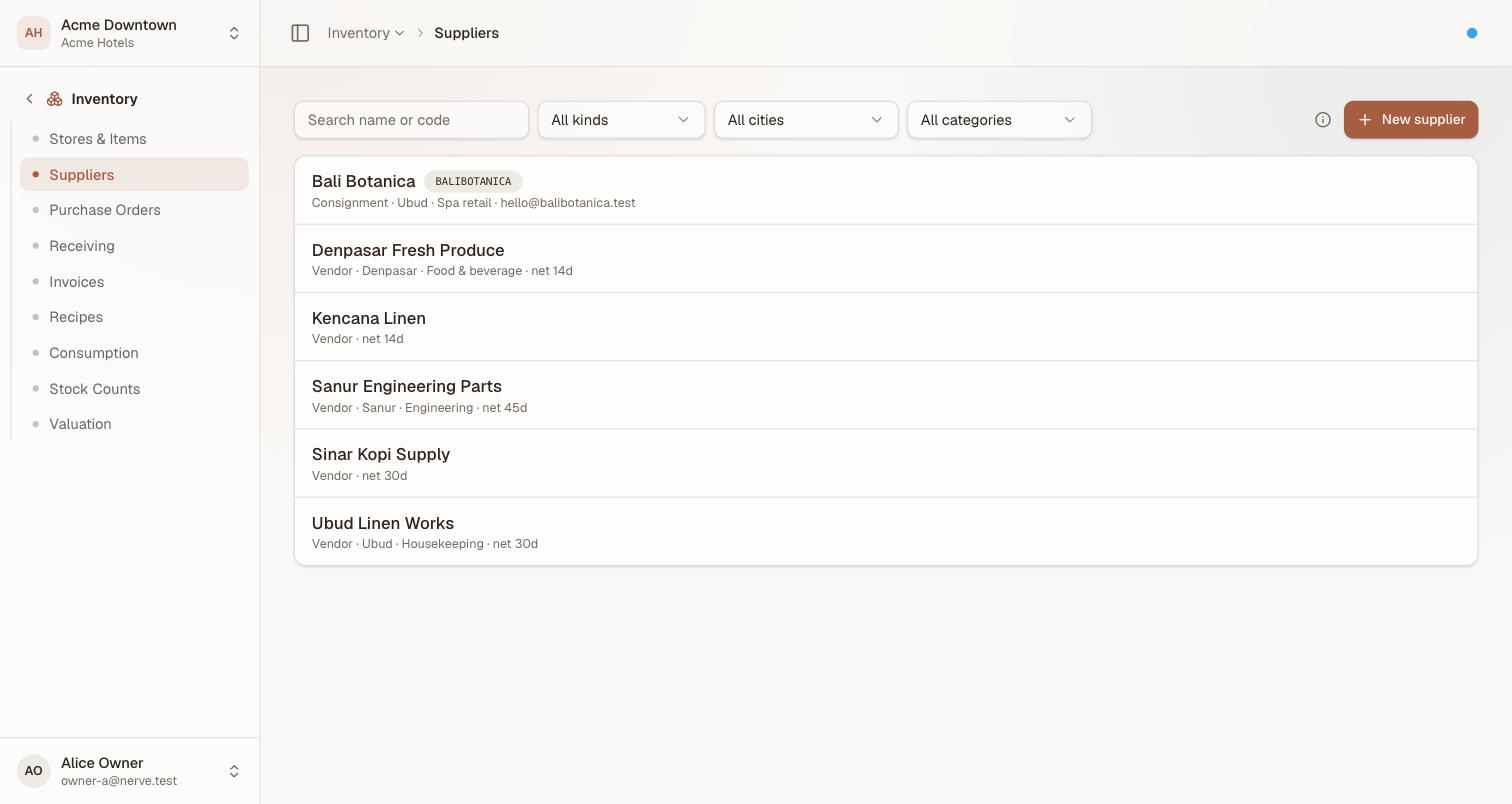
One list, one search. "Who supplies this?" is one question; the commercial structure is the answer, not a different screen.
Every row leads with its kind, then its city, category and terms. Filter by kind to see one or the other, and by city or category to narrow a long list — both of those are free text with no taxonomy behind them, so the dropdowns offer only values you have actually used and can never list an option that matches nothing.
Quan trọng
Kind is chosen when you create the supplier and cannot be changed afterwards. The deal terms, the settlement history and the payable account all hang off it, so flipping a vendor that has already been invoiced would strand rows no screen can explain. If a supplier genuinely changes footing, add the new record and deactivate the old one.
Adding one#
New supplier opens a dialog. Give it a Kind, a Name, and whatever else you know:
| Field | Notes |
|---|---|
| Code | Optional, and shaped as you type: letters and digits only, upper-cased. A code is unique per property, so acme and ACME are not allowed to become two records nobody can tell apart |
| City and Category | Free text. They exist to make a long list findable |
| Payment terms | Vendors only, digits only |
| Payable account code | Consignment suppliers only — where their share posts. A liability, not an expense: you are holding their money, not spending yours |
The form asks for payment terms or a payable account, never both, because the two kinds are settled in different ways.
The supplier's page#
A supplier has two tabs. Profile is who they are — the same fields, editable, with the kind shown but locked. Products is what the deal covers.
Which product list you get depends on the kind, because they are opposite directions of money: a vendor has a price list — stock items and what the hotel pays — while a consignment supplier has an article list, of what the hotel sells and keeps.
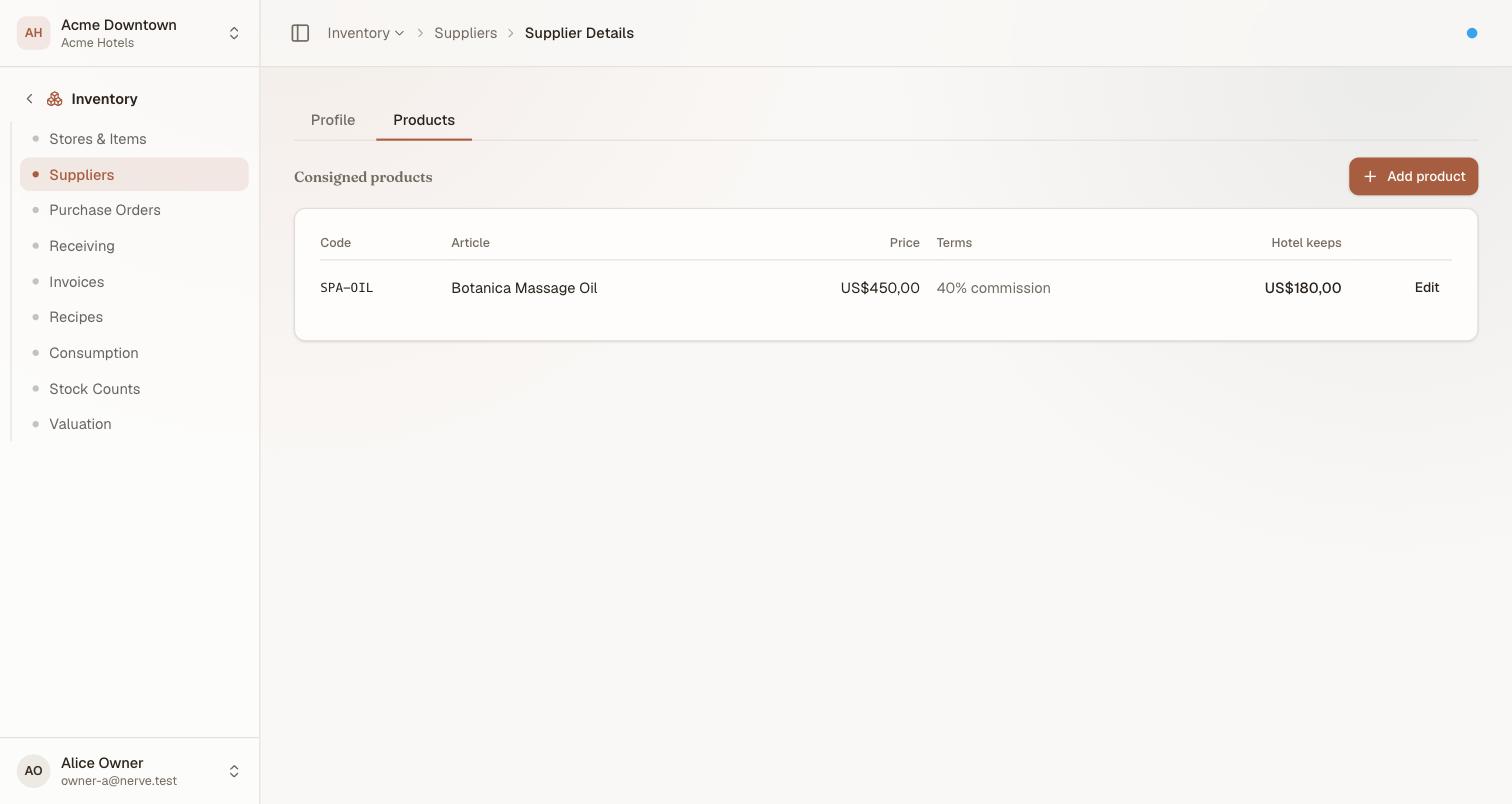
The terms sit on the product, not the supplier — two items off the same shelf routinely split differently. The breadcrumb is the way back: the Suppliers crumb returns you to the list.
The terms, per product#
Select Add product, pick the charge code the guest is billed for, and choose how the split works.
| Mode | Means | The supplier is owed |
|---|---|---|
| Commission | The guest pays the shelf price and the house keeps a percentage | The rest of the sale |
| Markup | The supplier is owed a fixed cost per unit | That cost, whatever the guest paid |
Both are shown as what the house keeps, because that is the number you are deciding. A US$450 article at 40% commission keeps US$180 and owes US$270.
Quan trọng
In markup mode a discount comes out of the house's share, and a below-cost sale goes negative. The supplier is owed their cost either way. Sell a vase with a US$300 cost for US$250 and the house's share is −US$50, shown in red and settled that way — rather than clamped to zero, which would hide a below-cost sale behind a number that looks fine.
An article belongs to at most one supplier. Adding one that is already consigned moves it rather than creating a second owner, because two owners for one shelf item is not a deal structure — it is a double payment.
Removing a product removes the terms, not the history: every sale copied its own split at the moment it happened, which is why last month's statement still reconciles afterwards.
Read the settlement#
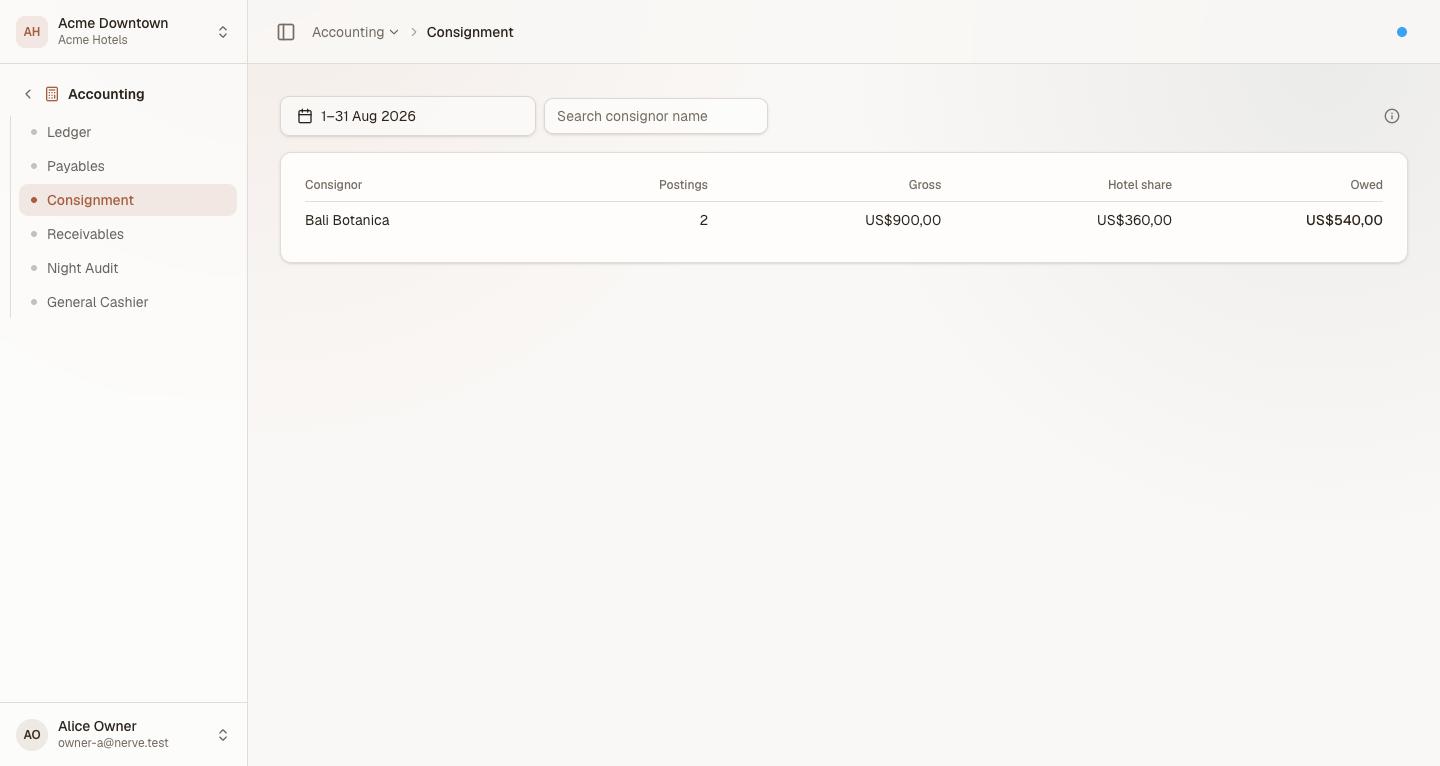
Sitting between Payables and Receivables, because that is what it is: a statement of what the house owes a third party, and the run that pays it.
| Column | Is |
|---|---|
| Postings | How many sales of that supplier's articles fall in the period |
| Gross | What the guests were charged, before tax |
| Hotel share | The part the hotel keeps as revenue |
| Owed | The part the hotel owes the supplier |
The period is yours to choose. It opens on the current month and the control above the table takes any range, so settling last month on the 3rd is a date pick rather than a wait for the calendar. The Search consignor name box narrows a long statement to the one you are paying.
Quan trọng
The split is recorded with the sale, not calculated from today's terms. Renegotiating from 60/40 to 50/50 next month changes what future sales record and leaves every past sale exactly as it was agreed. This table is a reading of history, never a recalculation of it — which is what makes a statement you already sent still reconcile a year later, and what makes changing the terms safe.
Only the hotel's share is revenue. The supplier's share posts to the payable account on their record, not to the revenue line, so a consignment article does not inflate the revenue report by the part of it you owe away.
Paying a supplier#
Nerve records what is owed; it does not move money. Read the Owed figure for the period, pay the supplier however you normally would, and record the payment against their payable account.
What's next#
- Charge codes, tax and billing setup — the articles a consigned product points at
- Accounts payable — the same shape for suppliers you buy from outright
- The general cashier — which takes the same period control
- The ledger — both halves of a consignment sale, in context