Accounting
Daily and period reports
Two reports from one journal: a closed day's revenue and takings, and the whole book's trial balance — with the CSV export and how to reconcile them.
Last updated
Who this is for: Accountant, Manager, Owner, Read-only — requires
backoffice.ledger.read. Where: Accounting → Ledger, and Accounting → Night Audit
There are two financial reports, and they answer different questions.
| The daily report | The trial balance | |
|---|---|---|
| Question | What did this property earn and collect on one day? | What does the whole book say, right now? |
| Where | Night Audit → Recent runs | Ledger → the card at the top |
| Scope | One property, one business date | The whole organisation, every property, all time |
| Produced by | Closing the day | Continuously — it is a live total |
Both are computed from the journal rather than kept alongside it, so neither can disagree with the ledger. There is no separate set of report figures to reconcile against; reconciling means checking your reading, not checking the system.
Read the daily report#
Closing a day stores its totals, and the row for that day in Recent runs on the Night Audit screen is the report:

The daily report is this row. Note Revenue and Payments have nothing to do with each other here — US$300.00 was earned that day, and the US$24,000.00 collected was an OTA remittance net of a supplier payment.
| Figure | Where it comes from |
|---|---|
| Room | Net credits to 4000 Room Revenue that day |
| Tax | Net credits to 2100 Tax Payable that day |
| Revenue | Room revenue plus 4100 Other Revenue — tax is not in it, because tax is not the hotel's money |
| Payments | Net debits to 1000 Cash & Bank — everything collected, whatever it was for |
A day only has a report once it has been closed. Today, still open, does not appear.
Reconcile a day against the journal#
The check is worth doing once on a property you have just brought live, so you trust the figures afterwards.
- Note the Date and Room figure from a run in Recent runs.
- Open the ledger.
- Find the entries carrying that date.
- Add up the credits to
4000across them, and subtract any debits to4000— a credit adjustment on a folio posts on that side.
The total is the run's Room figure. Repeat with 2100 for Tax, and with 1000 — debits minus credits this time — for Payments.
If they differ, the difference is nearly always one of two things:
- An entry belonging to another property. The journal lists every property in the organisation; the daily report covers the one you had selected. A second hotel's postings sit in the same list.
- An entry dated to a different business day. Ledger entries are dated by the property's business date at the moment they posted, not by the wall clock — so a charge taken at 01:00 sits under the night that had not yet been closed.
Read the trial balance#
The card on the Ledger screen is the period report, with the caveat that its period is everything.
It totals debits and credits per account across the entire journal, for the whole organisation, and marks itself Balanced when the two grand totals agree. What it is good for:
- The shape of the book. Guest Ledger against City Ledger tells you how much of what you are owed is still with guests in the house and how much has gone out to companies and channels.
- Cumulative revenue by kind.
4000against4100and4050. - What is owed and owing.
2000Accounts Payable and2100Tax Payable against1000Cash & Bank.
What it is not: a date-ranged report. There is no month or quarter selector on it. For a period, take the daily reports for the days in that period — that is what they are for — or export and total the export.
Export a report#
- Open the ledger.
- Select Export trial balance (CSV).
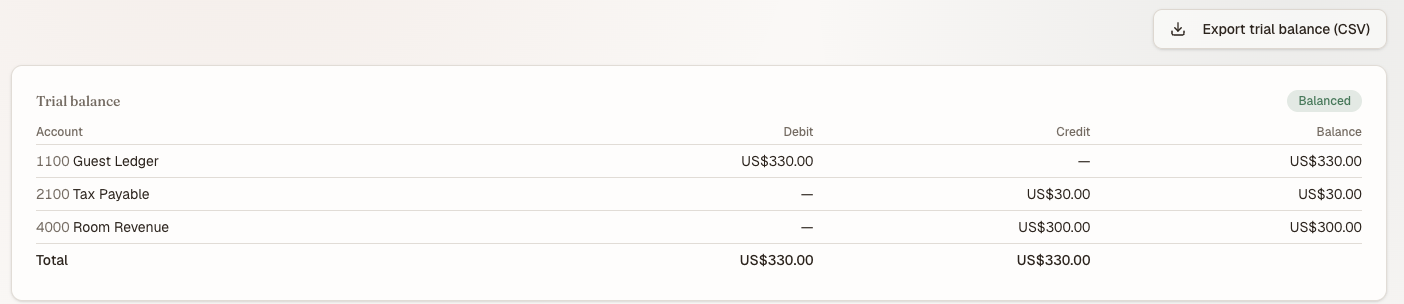
The period report, whose period is everything. Export trial balance (CSV) gives you these rows with amounts in integer minor units.
trial-balance.csv arrives with one row per account — code, name, type, debits, credits, balance — and a TOTAL row at the foot, matching what is on screen row for row.
Two notes for whoever opens it:
- Amounts are integer minor units. US$330.00 exports as
33000. Nothing is rounded on the way out, and your spreadsheet will not helpfully lose a cent. - A leading apostrophe on a text cell is deliberate. Account names beginning with
=,+,-or@are exported with one so the spreadsheet reads them as text rather than evaluating them as formulas. The apostrophe is not part of the name and does not display.
What's next#
- Running the night audit — the act that produces a daily report
- The ledger — the journal every figure above is derived from
- Accounting overview and the chart of accounts — what each account code means